













Best Wifi Router Test - Google Wifi vs Apple Airport Extreme vs Xiaomi Mi Wifi 3
By Sander SaarPublished Updated Length
Loading YouTube player.
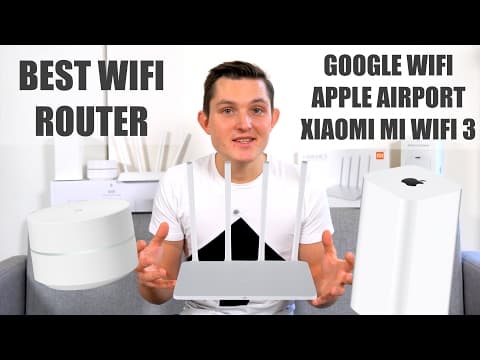
Best Wifi Router Test - Google Wifi vs Apple Airport Extreme vs Xiaomi Mi Wifi 3
Sander Saar compares three Wi-Fi routers: the Apple AirPort Extreme ($179), Google Wifi ($129), and Xiaomi Mi Wi-Fi 3 ($35), after experiencing heat and performance issues with his AirPort Extreme. He reviews and compares their hardware specifications, including Ethernet and USB ports, Wi-Fi standards, antennas, storage, RAM, weight, and features such as mesh networking and Bluetooth Smart readiness. He then demonstrates their mobile apps, contrasting the basic settings of Apple's AirPort Utility with the speed monitoring and plugins of the Xiaomi Mi Wi-Fi app and the automatic management, guest Wi-Fi, and Philips Hue integration in the Google Wifi app. Next, he runs real-life tests across three locations in his flat using a MacBook Pro, an iPhone 7 Plus, and a Google Pixel XL. In signal strength tests, Xiaomi and Google Wifi outperform the AirPort Extreme. In bandwidth tests, Google Wifi averages 633 Mbps, ahead of Apple at 590 Mbps and Xiaomi at 140 Mbps. In internet speed tests, Google Wifi averages over 20 Mbps, while Apple and Xiaomi drop to 15-16 Mbps. Sander concludes that he will keep the Google Wifi, recommending it over the Apple AirPort Extreme and suggesting the Xiaomi Mi Wi-Fi 3 for budget buyers.
Watch on AgentTVAsk about this video
Chapter summaries
Why upgrade your Wi-Fi router
Sander Saar explains that the growing number of connected devices at home requires better Wi-Fi routers. After experiencing heat and performance issues with his Apple AirPort Extreme, he introduces two alternatives: the Xiaomi Mi Wi-Fi 3 and Google Wifi, and outlines the hardware, app, and real-life tests he will run.
On screenA man in a white t-shirt with a black arrow graphic sits on a grey couch in a bright room, speaking to the camera with white router boxes and devices behind him. Animated title cards with red, black, and yellow banners appear over a blue textured background, followed by overhead shots of the three white router boxes and devices.
Apple AirPort Extreme hardware and specs
The host examines the Apple AirPort Extreme, covering its Ethernet and USB ports, Wi-Fi standards, dual-band antennas, flash storage, RAM, beamforming, weight, and price.
On screenIndoors, the host in a white t-shirt with a black arrow graphic sits on a grey couch with white router boxes, including a Xiaomi box and an AirPort Extreme box, arranged behind him as he speaks to the camera. Close-ups of the glossy white AirPort Extreme router on a grey fabric surface against a grey background pan down its rear panel to show a vertical row of black Ethernet ports, a USB port, and a power socket. The router is then shown beside its white retail box with a white specification graphic overlay reading '802.11a/b/g/n/ac 2.4 and 5 GHz'. Subsequent views show the top surface with a black Apple logo in the centre and a graphic overlay, followed by a side view of the smooth white tower housing with a small dot near the base. The AirPort Extreme and its box are shown again on the grey couch with a graphic overlay reading 'AirPort Extreme 945g $179'. The host appears again on the couch, gesturing with both hands before turning and reaching to his left. The chapter ends with a close-up of a hand holding a round white Google Wifi device on grey fabric, displaying its underside with two black Ethernet ports, a small central port, a G logo, and printed setup details, with its white box blurred in the background.
Google Wifi hardware and specs
The host reviews Google Wifi's hardware, including its two Ethernet ports, USB-C power, wireless protocols, storage, mesh networking, Bluetooth Smart readiness, spatial filtering, weight, and price.
On screenA matte white cylindrical Google Wifi router with a thin dark horizontal seam sits centred on a grey fabric surface, with its white retail box blurred in the background showing a multicolour G logo and Wifi branding. White on-screen callout graphics point to the device, displaying text including "802.11a/b/g/n/ac 2.4 and 5 GHz". The view shifts from a side-on angle to a top view of the router lying on its side, showing its flat circular top with a small central G logo. A close-up then shows the back of the white Google Wifi box resting on the grey fabric surface with the router out of focus on top of it, displaying printed black columns headed "What's inside", "How many Google Wifi points do I need?", and "Tech specs". After returning to the top view of the router in front of its box, a white callout graphic points to the device with the text "340 g" and "$129". The scene then cuts to a man with short dark hair wearing a white t-shirt with a large black upward arrow, sitting on a grey fabric sofa against a white wall and gesturing with both hands, with white router product boxes, including an AirPort Extreme box, a tall white device, and boxes with antenna illustrations, arranged on the sofa back behind him.
Xiaomi Mi Wi-Fi 3 hardware and specs
The host details the Xiaomi Mi Wi-Fi 3 router, highlighting its Ethernet and USB ports, Wi-Fi standards, four-element antennas, memory, beamforming, light weight, and low price.
On screenClose-up shots show a white flat Xiaomi router with four tall white antennas sitting on a grey fabric surface in front of its white product box, which displays an image of the router, an orange Mi logo, and text reading '小米路由器3'. The camera focuses on and pans across the router's rear panel, revealing a black USB port, two grey Ethernet ports, a blue Ethernet port, and a round power jack between the antennas. Further views show the router from the front and side while white callout line graphics point to its body, displaying on-screen text for '802.11 a/b/g/n/ac', '2.4 and 5 GHz', '128Mb Flash', '128Mb RAM', '224 g', and '$35'. The scene then cuts to the host, a man with short dark hair wearing a white t-shirt with a large black arrow, sitting centred on a grey couch against a white wall in a bright indoor room as he speaks and gestures with both hands. Arranged behind him on the couch are white router products and boxes, including a tall white tower, a round white device, and Mi and AirPort Extreme boxes.
Side-by-side specifications comparison
The three routers are compared side by side across flash storage, RAM, USB network drive support, Bluetooth Smart readiness, mesh networking, size, weight, and price.
On screenThree white Wi-Fi routers are lined up on a grey fabric surface in front of their white product boxes: a tall rectangular Apple AirPort Extreme tower with a black Apple logo on top on the left, a small round Google Wifi router with a G logo in the centre, and a flat Xiaomi router with four upright antennas on the right. On-screen labels with lines point to each device, displaying flash and RAM specifications across the bottom of the frame. The camera cuts between top-down views, low angled side views, and close panning shots across the rear of the routers, revealing Ethernet ports, USB ports, labels, and a QR code on the underside of the Google Wifi device. Additional on-screen callouts point to the round Google Wifi router with text reading Bluetooth Smart Ready and Mesh Networking. An overhead view then displays white labels pointing to each router with weight and height figures. The chapter concludes with an overhead shot of the three white retail boxes arranged on the grey fabric, showing the AirPort Extreme box, the Google Wifi box with cylindrical units, and the Xiaomi router box with an orange Mi logo and a silver four-antenna router pictured, while animated white lines and boxes appear over each box with price labels of $179, $129, and $35.
Mobile apps and software features
The mobile apps for all three routers are compared. The Xiaomi Mi Wi-Fi app offers per-device speed monitoring, limits, and a plugin marketplace, while Apple's AirPort Utility provides only basic settings. The Google Wifi app is praised for its automatic management, guest Wi-Fi, and built-in home control for smart devices like Philips Hue.
On screenIn a bright indoor room, a man with short dark hair wearing a white short-sleeved t-shirt with a large black upward arrow graphic sits centred on a grey couch against a white wall, speaking and gesturing with his hands. Arranged along the top of the couch behind him are white router boxes and hardware, including a Google Wifi box on the left, a white multi-antenna router, a Xiaomi box with an orange Mi logo, and an AirPort Extreme box on the right. The video then cuts to overhead close-up views of two hands holding a black smartphone over the white Google Wifi, Xiaomi Mi Wifi 3, and AirPort Extreme boxes on a grey fabric surface. The user scrolls and taps through several mobile router apps. First, a blue-headed app displays a device list with speed figures, a device detail page with access control and internet denial options, a storage page illustrating a USB storage device and router, a plug-ins grid of colourful circular icons, a Wi-Fi boost checking screen with a percentage counter, and Wi-Fi settings with toggle switches. Next, the screen shows a dark app page with a globe icon above a router icon, followed by light detail list pages for an AirPort base station showing IP address, firmware update status, network security, 5GHz and 2.4GHz channels, and connection details. The user then navigates a blue-headed Google Wifi app featuring a network diagram, network usage figures, a devices list, a single device usage graph, illustrated cards for setting up Guest Wi-Fi and Family Wi-Fi, a shortcuts grid, and a Home Control page listing a controllable Philips hue light. Finally, the view returns to the man in the white t-shirt seated on the grey couch, speaking and gesturing to the camera with the Google Wifi, Xiaomi, and AirPort Extreme boxes and the white multi-antenna router behind him.
Real-life test setup
The host explains the real-life testing methodology, comparing the three routers using a MacBook Pro, iPhone 7 Plus, and Google Pixel XL across three locations in his apartment.
On screenA man in a white t-shirt with a black arrow graphic sits on a grey couch against a plain white wall, speaking to the camera and gesturing. Arranged behind him on the couch are white routers with multiple antennas and product boxes for Google Wifi, Xiaomi, and AirPort Extreme. The video cuts to an open MacBook Pro laptop on a grey surface displaying a SPEEDTEST webpage with a gauge and chart layout, flanked by a black smartphone leaning against each side of the screen. Subsequent cutaways show a computer screen with a Wi-Fi diagnostics popup featuring network details and two line graphs, a hand holding a black smartphone displaying the Wifi Analyzer app with a semicircular gauge in front of an out-of-focus laptop, a computer screen showing a SPEEDTEST website with a teal and green map of the UK and Europe and a BEGIN TEST button, and a hand holding a black smartphone showing a SPEEDTEST app with a circular gauge and ping, download, and upload fields. Returning to the couch, the man picks up a black tablet displaying a hand-drawn floor plan with light blue and yellow markings and a row of coloured dots at the bottom, pointing at different parts of the drawing while speaking. He then continues speaking and gesturing on the couch in front of the routers and boxes, with the framing moving from a closer to a wider view.
Signal strength test
Signal strength is measured in dBm next to the router, through one wall, and through two walls, with Xiaomi and Google Wifi outperforming Apple AirPort Extreme.
On screenIn a bright indoor room with white walls, a man in a white t-shirt with a black arrow graphic sits on a grey couch, speaking to the camera and gesturing with his hands. Behind him on the couch are white Wi-Fi routers, including one with tall antennas, and white product boxes, including a tall white box and one with an orange logo. A white bar chart overlay on the right side of the frame displays blue, green and orange bars comparing signal strength on a dBm scale from 0 to -70 for Xiaomi, Google and Apple, also labelled AirPort Extreme, across Near, 1 wall and 2 walls positions, with on-screen text reading "SIGNAL STRENGHT -dBM (lower is better)" and "Lower is better". The chart expands and then fades out as the shot tightens to a medium close-up of the man continuing to speak and gesture, with the white routers and boxes remaining visible behind him.
Bandwidth test
Bandwidth between the router and devices is measured in Mbps, where Google Wifi wins overall at 633 Mbps on average, followed by Apple at 590 Mbps and Xiaomi at 140 Mbps.
On screenIn a bright indoor room with a plain white wall, a man in a white short-sleeved t-shirt with a large black arrow graphic sits centred on a grey fabric sofa, speaking to camera and gesturing with his hands. Behind him on the sofa back are white plastic wifi routers with upright antennas and white product boxes, including retail boxes for Google Wifi on the left, Xiaomi Mi Wifi with an orange logo in the centre-right, and a tall white Apple AirPort Extreme box on the right. For the first part of the chapter, a bar chart overlay on a white background appears in the upper left, showing blue, green and orange vertical bars for Xiaomi, Google and Apple measured from 0 to 900 Mbps. The chart progressively displays three groups of bars labelled "Near", "1 wall" and "2 walls", alongside the text "Higher is better", while on-screen text at the lower left reads "BANDWIDTH / TX Mbps (higher is better)". Later, the bar chart fades away, leaving the man and the routers and boxes behind him fully visible as he continues speaking and gesturing.
Internet speed test
Internet speed is tested across the three locations, with Google Wifi maintaining over 20 Mbps on average while Apple and Xiaomi drop to 15-16 Mbps.
On screenIndoors, the host in a white t-shirt with a large black arrow sits on a grey sofa against a plain white wall, speaking to the camera and gesturing with his hands. Arranged behind him on the back of the sofa are white router boxes and white router hardware with upright antennas, including Google Wifi packaging on the left, a Xiaomi box showing a router illustration, and an AirPort Extreme box on the right. During the first part of the chapter, the host is positioned on the left while a white bar chart overlays the upper right of the frame alongside a lower-right label reading 'INTERNET SPEED Mbps (higher is better)'. The chart uses blue, green and orange bars on a scale from 0 to 24 Mbps to compare Xiaomi, Google and Apple, progressively displaying groups for 'Near', '1 wall' and '2 walls'. Once the chart disappears, the host is shown centred on the sofa in both wider and closer framings, continuing to speak to the camera and gesture with open and clasped hands.
Final verdict and recommendations
Sander concludes that he will keep the Google Wifi router for its strong signal, high bandwidth, fast speeds, compact size, mesh networking, and Bluetooth Smart readiness. He recommends the Xiaomi Mi Wi-Fi 3 for budget buyers and Google Wifi over the more expensive Apple AirPort Extreme.
On screenThe host sits on the grey couch in front of the white router boxes and devices, speaking to the camera and giving a thumbs-up. The video ends with blue-grey textured title cards featuring red, black, and yellow banners.
Transcript
Hi everybody, I'm Sanda and I believe in technology. As the number of connected devices is increasing rapidly, the Wi-Fi routers need to change as well. In my home, at any given point, there's more than 20 devices connected, and so far I've been using the Apple AirPort Extreme to connect all of them, but I've had some performance and heat issues because of the location and the size of the router. I was looking for alternatives and came across the super affordable Xiaomi Mi Wi-Fi 3 and the latest release from Google, Google Wi-Fi.
Let's take a look. All wireless routers have several different things affecting them, from the bands that they support and the I/Os that they have on them, to all the way to your home build and the location you put your router. So this comparison test is completely subjective, though I try to show you the relative performance to each other. In this video, we'll be looking at the Apple AirPort Extreme that was released in 2013 The Xiaomi Mi Wi-Fi 3, which was released in 2016, and the newest to the family, Google Wi-Fi.
First of all, let's take a look at the specs and the hardware that it comes with, and also the app and the controls they provide, compare them to each other, and also run an unscientific test in my home to test the signal strength, the bandwidth, and also do some internet speed tests. Let's take a look at the Apple AirPort Extreme. On hardware side, the The AirPort Extreme houses 4 Ethernet ports, 1 for the connection to go in and 3 to distribute it across the cable connection around your house.
It is also housing a USB interface for all of your network drives. It's supporting the latest protocol 802.11abgnac standard. It's had a dual-band 2.4/5 GHz antennas. It's got a 6-element antenna array and supports the latest security standard WPA-PSK and houses 32 MB of flash and 512 MB of RAM. It also supports beamforming, or what is also known as spatial filtering, meaning it can direct the strength of the signal towards the device that is using it.
It weighs 945 grams and costs $179. Now let's take a look at Google's hardware. On hardware side, Google houses 2 Ethernet ports that can be used either to point the internet from your modem to come in and one to share it with other devices, Or if it's on a mesh network, you can use both of them to share connection to your cable devices. And the USB-C for power. Inside, it also supports the latest 802.11 protocols: a/b/g/n/ac.
It's got a dual-band simultaneous 2.4 and 5 GHz antennas. It's housing 4 GB of flash and 512 MB of RAM. It's supporting the latest security standard WPA-BSK. It has got mesh networking capability, very similar to Eero devices that you might have seen before that are well known, where the devices can connect to each other and create a larger, more stable network at your home. It's also Bluetooth Smart ready, so all your smart home devices might in the future be able to connect to it as well.
And similar to Apple, it also supports performing spatial filtering to direct the strength of the signal towards the devices. It weighs 340 grams, about a third of Apple's weight and costs $129. And last but not least, Xiaomi Mi 3 Wi-Fi hardware. Xiaomi Mi Wi-Fi houses 3 Ethernet ports, one for the connection to go in from your modem and 2 to share them with your cable devices. It also has a USB to connect your network drives and also provides an app for you to access those files.
Inside, it's also supporting the latest protocols: 802.11ab/g/n/ac and The dual-band simultaneous 2.4/5 GHz Wi-Fi. It's got 4-element antennas, has 128 MB of flash, 128 MB of RAM. It has, it's supporting the latest security WPA2-PSK standard. It is also supporting the beamforming or spatial filtering to divert the strength of the signal towards the devices that need it most.
It only weighs 220 grams, being the lightest in the mix, about 4 times lighter than Apple, for example. And costs only $35. So what is the difference, you might ask? Why should I pay 5 times more compared to the Xiaomi Mi Wi-Fi 3 to the AirPort Extreme? One of the first differences is in the flash storage they have. While AirPort Extreme only has 32 MB of flash storage, the Xiaomi has 4 times more, 128 MB, and Google is housing 4 GB of flash storage on board.
On the other hand, Apple has 512 MB of RAM similar to the Google Wi-Fi, and Xiaomi has only 128 MB of RAM. Another difference in these devices is that Google does not support USB network drives, while the AirPort Extreme and the Xiaomi one house USB ports on them. Another difference is that the Google device is the only one which is Bluetooth Smart ready to connect your potential future Bluetooth Smart devices directly to the router.
And Google is the only one also to support mesh networking, meaning you can build a larger network across several devices that will talk to each other and choose the most strongest device related to where you're located. There's also difference in weight and size. Google, being the smallest in the mix, takes least space at your home, followed by Apple Airport Extreme and then the Xiaomi Mi Wi-Fi. Xiaomi Mi Wi-Fi is at the same time the lightest at 220 grams, Google 345 grams, and Apple Airport Extreme being almost a kilo.
A similar comparison also applies to the price. While the Xiaomi Mi Wi-Fi you can buy at around $35, the Google one you have to pay $129 for one, or you can buy a 3-pack for $299. And Apple Airport Extreme costs you $179. They all also come with mobile apps. While the Apple Airport Extreme only has iOS and OS X apps, the Xiaomi as well as the Google both have iOS and Android apps.
Xiaomi Mi Wi-Fi app first of all allows you to see the current upload and download speeds, also see that per device, and also set limits per device basis. It also shows you the storage and allows you to reset your network drives here. And it also has got a marketplace for plugins where you can see updates, you can see weekly stats, you can set security for your Wi-Fi router, you can use Wi-Fi Boost to check whether you're on the right channel, and you can also set Wi-Fi timers off when you don't want someone to be able to access your Wi-Fi.
Besides, you can check the status of the hardware, the storage, and the Wi-Fi network settings. Apple Airport Utility hasn't seen any updates for almost years. So you can only see very basic things like update your router here. You can see how many devices are connected. You don't see necessarily their names, but you will see their addresses, IP addresses, and you'll be able to configure your Wi-Fi to use which of the bands and change the name and password for your connection.
Google Wi-Fi app allows you to set up your router and the wireless network settings, also see all of the different devices connected, set their priorities based on the speed, and also check your network settings. Everything else is done automatically. You can also set up guest Wi-Fi, and different to any, any of the other apps, you can also have home control in here. So for example, you can have your Philips Hue connected directly to your router, which you can control within the app.
Apple Airport Utility definitely provides least control and support for your network, while the Google and Xiaomi one are actually on par and very similar Only difference is that Xiaomi has an app store which you can probably see other network services coming and offering integration directly to your router like VPN services. But Google one has also housed home control devices, which means you can control devices without even having access to the account.
Someone just being on your network and being able to control your lights, for example. So now let's get into the real-life test. In this test, I was comparing these 3 routers' performance against the 3 different devices that I have, which is the iPhone 7 Plus, the Google Pixel XL, and the latest MacBook Pro. And there were 3 things that I wanted to measure. First of all, the signal strength of different locations that I was able to do in my MacBook using the Wi-Fi diagnostics tool and on Android using the wireless diagnostics tool.
And the second thing I wanted to measure was the bandwidth between the device and the router. I was able to do that also on my MacBook and also on my Pixel XL device. And a third and final thing, which is the most subjective because it's down to also my internet service provider, I used the speed test across all of these devices and across 3 different locations. And the 3 places that I wanted to measure the signal strength, the bandwidth, as well as the internet speed are here.
So this is the map of my home. The Wi-Fi router is placed here just because I have modem coming in there. It's possible to get it anywhere else. So the first one is next to the Wi-Fi router itself. The second one is like 5, 6, or 7 meters away, and it's one wall that is separating it. So the signal has to break through one wall. And then this third place is the furthest I can go in my apartment, so the signal has to break through 2 walls.
In every location with every router and every device, I ran at least 3 tests and took the average. You will see all of the details in a link down in the About section, which will show you all the measurements. To replicate the standard home scenario, all of them will be running on automatic settings where they choose their own channel and bands they'll be running on. First of all, let's take a look at the signal strength. While all of the devices being next to the routers, they all showed a really good -38 dBm signal strength.
While going one wall away, Xiaomi and Google managed to perform equally well, only adding 10 dBm to the loss of signal, while Apple adding 20 dBm in loss of signal. Going through 2 walls, Google managed to maintain almost exactly the same level as through 1 wall, while Xiaomi and Google both, Xiaomi and Apple both had 20 dBm loss. So if you take the average average across all of these 3, Xiaomi and Google were definitely exceeding Apple in this instance.
Secondly, let's take a look at the TX rating, or the bandwidth between the router and the device. So how much data can go through? While Google Wi-Fi and Apple managed to perform really well next to a router at 870 Mbps, Xiaomi really fell short at only about 200 Mbps on average across devices. The reason for that could be that Xiaomi chose 2.4 GHz connection for the Android device, while every other device it chose 5 GHz connection.
While going through the first wall, the bandwidth for Google managed to stay at around 560 Mbps, While it was halved for Apple to around 460 Mbps and in Xiaomi 120 Mbps. Going through 2 walls, Xiaomi halved again to 70 Mbps while Google managed to maintain very strong level at 468 Mbps and Apple managed to keep the same through 2 walls.
And overall average, Google managed to hit this really well and is the winner at 633 Mbps on average across all of these 3 scenarios and devices. Apple just being very close to it at 590, and Xiaomi really falling behind at 140 megabits per second bandwidth. And thirdly, let's get into the most subjective test because it also includes my internet service provider talking to the router and then talking to my device, which is really varied because the internet service provider doesn't guarantee a most stable connection.
But I just did many, many tests, 3 times on each device and each router, to see the average across the board. While being next to the device, all of the routers offered around 20 Mbps connection, while Google being the fastest at 23 Mbps. The differences came when I was moving away one wall, where Google managed to maintain the 21-22 Mbps connection. Then both Apple and Xiaomi lost about a third and were counting at 14 Mbps.
And similarly, when I went even 2 walls away, then both Apple and Xiaomi declined even more in the speed test at around 12 Mbps, while Google managed to maintain the 20 Mbps connection even while built 2 walls away. So on average, even though subjective, a clear winner here is Google at up to more than 20 Mbps on average, while Apple and Xiaomi fall behind at 16-15 Mbps on average across those 3 tests.
Another interesting side note with the devices is that Google Pixel was the fastest on Xiaomi router, iPhone 7 Plus was the fastest with Google router, And MacBook was the fastest using Apple's own router. Overall, on average, across all of the 3 routers, all of the 3 devices equal out at a similar speed at 18 Mbps, but Google still had the edge at 18.3 Mbps and MacBook having 17.8 Mbps.
So all of the latest wireless devices, doesn't matter whether it's desktop or your phone, actually give you very similar speeds. So to conclude, I'll be keeping my Google Wi-Fi router and will be selling Xiaomi Mi Wi-Fi as well as AirPort Extreme here. Why? Because Google offered the highest signal strength across the board, on par with Xiaomi's router. It offered the highest bandwidth, on par with AirPort Extreme, but also offered the highest speed test compared to other routers.
Besides, I like Google being the smallest in the mix as I have a tight space around here and it's easy to fit it anywhere. The ability to build on mesh networking when I'll be moving in the future to other places, and also being Bluetooth Smart ready whenever those other devices will be supported on the platform. It is 3 times more expensive than Xiaomi Mi Wi-Fi, so if you're on a budget, I recommend going with that. But at the same time, it's still 30-40% cheaper than the Apple AirPort Extreme, so I would recommend considering Google Wi-Fi.
Thank you very much for watching this video on the different Wi-Fi routers. I hope you enjoyed it. Please let me know in the, clicking on that I button here, which one of the routers you already have or you would like to get for yourself. And if you also believe in technology, please hit that subscribe button and thumbs up, and I hope to see you next time.