






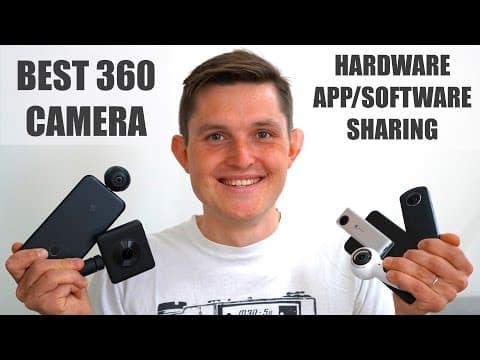



Best 360 Camera pt 2 - Xiaomi Mi 360, Samsung Gear 360, Insta360 Nano, Insta360 Air, Ricoh Theta S
By Sander SaarPublished Updated Length
Loading YouTube player.
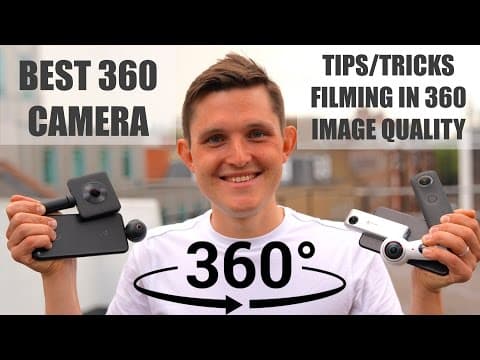
Best 360 Camera pt 2 - Xiaomi Mi 360, Samsung Gear 360, Insta360 Nano, Insta360 Air, Ricoh Theta S
Host Sander Saar provides tips for filming, editing, and distributing 360-degree content while comparing five consumer 360 cameras: the Xiaomi Mi 360, Samsung Gear 360, Insta360 Nano, Insta360 Air, and Ricoh Theta S. Side-by-side tests evaluate still photo clarity, daylight and nighttime video quality, onboard audio, and movement stabilization. The video concludes with an overview of current consumer 360 technology and its storytelling potential.
Watch on AgentCDNChapters
Introduction to 360 cameras
Host Sander Saar introduces the 360-degree video comparison and outlines the cameras being tested, including models from Xiaomi, Samsung, Insta360, and Ricoh.
Tips and tricks for filming in 360
Sander shares essential filmmaking advice for 360-degree video, explaining how to direct viewer attention, treat the camera as a participant, and avoid motion sickness.
Editing, distribution, and consumption
The discussion shifts to post-production workflows, software plugins, platform support on YouTube and Facebook, and VR consumption hardware.
Image quality comparison: photos
A side-by-side comparison of 360 still photo quality across the Insta360 Air, Samsung Gear 360, Insta360 Nano, Ricoh Theta S, and Xiaomi Mi 360 in daylight and low-light.
Image quality comparison: video
Sander compares video performance among the cameras at an outdoor funfair, along the Thames riverfront, and during nighttime street scenes.
Audio and stabilization test
Walking and jogging tests demonstrate onboard microphone quality and rotational and vibration image stabilization across the cameras.
Conclusion and final verdict
Sander summarizes the state of consumer 360 cameras, discussing resolution, storytelling potential, and future hardware improvements before signing off.
Transcript
Hi everybody, I'm Sande and I believe in technology. I'm just sitting here next to you, so grab your VR headset of choice. Doesn't matter whether it's Cardboard, Gear VR, or just use your phone by using your finger to find around, or just tilt your phone to see the video in 360. As today we'll be talking about 360 cameras, how we capture video in 360, distribute and consume, as well as look at the image quality from some of the most popular 360 cameras Including the Insta360 Nano that I'm using now, Samsung Gear 360, as well as Ricoh Theta S and the new Xiaomi Mi 360 cameras.
Let's take a closer look. In this video, we'll not be covering the hardware and the software of these cameras, so if you want to see that, just go to the link in the about section or click on the info button above this video. I bought my first consumer 360 camera capable of shooting photos and videos in 2015. That was made by Ricoh Theta when they launched their first.
Over that time, I've been using the old Samsung Gear 360, but at the moment I'm using the new 2017 Gear 360 image you're seeing currently, as well as the Insta360 Nano for iPhone, Insta360 Air for Android, as well as a Ricoh Theta S, which is development for the original Ricoh Theta and the recently launched Xiaomi Mi 360 cameras. In this video, we'll be talking about some of the tips and tricks when filming and creating 360 video, as well as distributing and consuming it.
And also, together with you, we'll be comparing the image quality coming out of all of these different cameras to help you make a better decision when you're looking at your first 360 cameras. When you're looking at the video, you will see a small sign next to me which camera we're currently using as we'll be kind of switching back and forth of all of these different cameras all the time. So I hope you'll enjoy. 360 completely changes the way we capture, edit, as well as distribute and consume 360 videos.
First of all, let's talk about the capturing side and some of the tips to keep in mind. First thing that is most important is that when you're filming in 360, we're not talking about frames anymore, but we're talking about creating worlds. So every viewer has has a chance to divert their attention where they like to look at or what they like to see. So we have to rethink how we direct people's attention within these spaces and how we can create frames rather than worlds to get that full experience.
So how do we create these worlds? Within these worlds, we have to create different points of interest where the story is happening, where the action is happening there. For example, something happening on the road, you can take a look at there, or you can also On the other hand, hide things in the frame and get people to enjoy that experience of finding things out themselves. A great way to do that is also audio. A lot of the good, really good 360 cameras have something called spatial audio, where they can create that sense of where the sound is coming from.
In this video, I'm just using a microphone on me to direct your attention, so when you hear someone talking, myself, then you want to look for me in the frame to see where the action is happening. Another thing that you should keep in mind is that the camera in this case is not a tool anymore, but the camera becomes someone in the story. So the question is, who are you? Imagine if I put yourself on a countertop, or you'll be on a stage, you'll feel completely out of place.
It's not a place where you're supposed to be if you're just sitting actually in your home. But if I put you somewhere where you can have a role, like in my video, you're my friend and we're just talking about hanging out and talking about 360 videos, You have a role in this video. So you have to always think about what's the role of the person, or the camera in this case, which is not a tool, but a person or someone in your video. Another thing to use then is eyesight, but also don't overuse it because you don't want someone to feel kind of intimidated about you just looking at them all the time.
Also, we have to keep in mind that people are quite often sitting or standing still. So any kind of active motion is going to make people motion sick. So try to keep it steady generally, and when you're filming action shots, try to use the cameras that have vibration stabilization as well as the rotational stabilization, meaning that when you shake your camera one way or another, they don't get sick.
Also, this definitely impacts how you're going to edit your videos, because when you go to any editing program You're not just talking about cutting frames like close-ups, wide shots. You can do that in a way in 360, but that works completely different way. So you have to think about how to create those worlds that are interesting for people, that have some points of interest using audio and using the action happening in there. And all about editing is kind of estimating people's attention, estimating where they're going to look at to take over the story in the next frame.
Some of the other more technical things to keep in mind when creating 360 video is always to keep the lens towards pointing at your object rather than as a side, because otherwise if you end up with any of the stitching errors, you will see them right on your object. So always keep the lens towards your object and far away, a little further away as possible, because again, if you think about someone being right in your face like I am for you now, it feels just really intimidating.
And also the face looks weird because you're using the really wide fisheye type of lens that is just attached together with another lens to create that 360 image. Another way to make your videos look better is to use support. I know a lot of the cameras, especially the Insta360 ones, are attached to your phone, so you almost have to use your phone, but I recommend highly using a bracket, a GorillaPod, or a monopod when you're filming, as they will help your person who's watching that video or that photo to feel not out of place, but actually feel that they have a role in that video, as we talked earlier.
Moving on to editing, it's also slightly different from how you would edit videos normally. You would need special software in order to divert people's attention and actually move inside the world when a new world comes. But you're still using the same type of software as you would use in nonlinear editing software, where you just use a really wide-angle image that is stitched together, and then you're doing your edits between the different worlds. You have some of the plugins available.
They're quite costly, but you really need them to make the story work. Also, When you're sharing your video out of those applications, you have to use some additional support from Google, for example, in order to help the player understand that it is a 360 video. You need special tags for it, unless you're sharing directly from a phone, in which case some of the applications already recognize these videos and photos as 360. Most of the big players have already jumped on board.
So Facebook is supporting 360 videos as well as 360 photos. Google and YouTube is supporting 360 videos. There is also support from Twitter and Periscope for 360 videos and photos. And some of the platforms, including Periscope, Facebook, and now YouTube, have jumped also on board of live streaming 360 videos. Of course, that is nowhere as good quality because you need really high bandwidth for that in order to support the full HD video.
And even then, you're looking at the really tiny piece from the player, which really makes it pixelated and not a very enjoyable experience. So there's a far a long way to go in order to make that work on live streaming. But that also ties back to when we're talking about consumption. Yes, there's some of the great players out there from Facebook and YouTube who support viewing 360 video, but in order to look really, really nice and crisp, you at least need a 4K resolution.
Now, streaming 4K resolution on a phone, you need a really solid 4G or LTE connection or a nice high-speed bandwidth for your broadband. But that is something a lot of people don't have. So when you're viewing even just on your phone, you really want this to set, settings to be at the highest resolution as possible in order for the image to look nice. I would recommend doing that for this video as well in order to see the full perspective of these cameras. And when talking about the devices, we currently have all the screens that support your using your finger through looking through the image or just tilting your phone around.
There's also more immersive, really cheap options out there like the Cardboard from Google, as well as the Gear VR from Samsung, or the Google Daydream VR headset, which all cost from $10 to $100. They're really approachable again, but you need this high-resolution camera in order to make it look nice and feel the full immersion. Also, there's the professional VR headsets out there from Oculus as well as HTC, but again, these cameras don't really require that because they don't shoot high enough resolution to justify having these professional viewing devices.
But I think all of these things need to become mass market to make the whole value chain work from creation where we really have loads of cameras available now at a really affordable price point, to editing, to distribution, the platform support which we're still missing. There's no Instagram support, for example, and some of the other platforms don't support live streaming. And then the consumption side where everybody will have a VR headset or ultimately a mixed reality headset where you can port yourself in this world to wherever you want to be in the most least intrusive way.
But if you want to see more on that whole subject, I've actually created a mini-series on virtual reality and all the things you know about virtual reality. So go and check that out as well. There's a link down in the description as well as on the info button.
And now let's get into looking at the image quality. And first, we'll take a look at the photos from these cameras. I've listed them in a, in a row of quality increase. So the first one is the poorest coming from Insta360 Air. That's just because the resolution, there is not much detail available. Followed by Samsung. It's really soft image for some reason. If you look at the leaves on these bushes, you can't really see any details, and it's overly saturated image.
Then Insta360 Nano, which actually in reality has got a lower resolution but has maintained more details, and it's still a little bit oversaturated but has more details than Samsung Gear 360 in this case. Ricoh has a very nicely balanced color in its image. And has a similar resolution as Samsung Gear 360 at 15 megapixels. It looks nice and it's totally shareable and usable. But Xiaomi in this case is at a completely different league because of the resolution that it can provide.
The colors are a little bit off, but again, you can always adjust them later if you wish so. But everything that you've just seen breaks completely down when you look at the nighttime or even evening photos. It's not completely dark outside, but it's the kind of photo you would take indoors. First of all, Insta360 Air Then Nano, they're both really poor and I wouldn't say they're usable images. That probably comes down from the sensor size they're using. Then Samsung Gear 360, which slightly improves and it's much better.
And then followed by Ricoh Theta S, which is even in low light doing a really good job when recording photos. And again, the winner for me in this case is the Xiaomi Mi 360 camera. Again, keeping in mind that Mi 360 as well as Ricoh Theta and Samsung are all downsized, for the comparison as you're looking at a 4K image from here. I will be uploading the full resolution photos also on my website.
And now moving on to video, taking a look at Ricoh Theta S first in a funfair. I really like the colors and the balance Ricoh is producing, but the problem is still the resolution. It's only HD and really blurry image to look at in 360 environment. Insta360 increases the resolution, which makes it look much nicer But again, I don't think the colors are completely on here, and the same can be said to Insta360 Nano.
It's much more oversaturated image, but the resolution is higher, so it also looks better. Samsung is also producing really nice images, but there's something going on in the edge of the, of the lens. If you look, there's kind of lines on the image, but again, the image generally looks really nice. It's slightly overexposed, but still very nice. Xiaomi Mi 360, again, the colors are off, but it's completely from a different league on its own.
It just has much better dynamic range if you look at the big tree over there. And now looking at another scene, again, Ricoh Theta S producing nice balanced images, but there is just not enough resolution. It really well also balances the sunny side of the lens and the, and the shadow side of the lens. Insta360 Air in this case is doing a really good job, and it's so far my favorite image that is coming out of it. Insta360 Nano makes it slightly better because the colors are more accurate in this case, and the resolution is very similar to the Insta360 Air that you saw just before.
Samsung in this case is providing to be also very, very nice image, really sharp, and there's enough resolution and much better dynamic range than both of the Insta360 cameras, especially looking at the London Eye across the river. But again, Xiaomi Mi 360 in this case is again completely different league. The colors are still off, there's something going on with the white balance I think, which we can adjust later, but it just looks so much better even at lower resolution.
And now looking at the darkness, where actually things are a little bit different. Insta360 Air is so poor and completely unusable. It's just full of noise and there's not much you can do with image. Same can be said to Insta360 Nano, where it's slightly better, but still not really usable image when you're using it for video in the darkness. In this case, Samsung is also not performing well at all, especially when you look at the windows and the lines.
There's so much noise going in inside that video, and I think it's just trying to overexpose, and that's introducing the high ISO. But Ricoh is actually providing really balanced image even though it's a lot lower resolution. It's actually much more usable and nicer image than the higher resolution cameras that we just looked at. Favorite, I think the best job is still done by Xiaomi Mi 360 camera, which is the cleanest.
But now let's take a look at the audio comparison coming out these cameras, as well as the stabilization in real-life environment.
Now I wanted to test out the audio, how well you can hear me without an external microphone coming straight from the camera, as well as how stable it is when I'm just kind of moving and I'm now swinging my hand a little bit.
And I will do the same with all of the different cameras.
This one has a stabilization built in, so let's see, and the rotational stabilization built in. So let's see how well that works if you're kind of just twisting your arm as well as swinging it. And now I'm doing a little bit of a jog, and let's see how good of a job it's doing then.
Insta360 Nano is definitely doing the best job in stabilizing the image than any other camera in this test.
And doing the same thing with Insta360 360 Air now, just seeing how good the audio is coming straight from the camera without using my external microphone, and also how good the stabilization is when I'm swinging the camera, swinging the camera from left to the right, and then also rotating now, which is a typical scenario when you would be live streaming. So let's just see how stable it is. And now also let's do a little bit of a jog and see how well It keeps up then.
All right, and now let's see how well the onboard audio works from the Ricoh Theta S camera compared to the other cameras and also compared to the external microphone, and also how well the stabilization works when I'm swinging the camera or when I'm rotating the camera. As this one is not stabilized, it will probably get the viewers sick. So you have to keep these things in mind unless you have a camera that is stabilized.
And also, let's see how good it does when I'm jogging, so when the vibration is happening. All right, and now I want to see how well the audio works coming from the new Samsung Gear 360 camera. Without an external microphone, just in its usual setup. And also how good the stabilization is when I'm swinging the camera as well as rotating the camera.
That should just show you the difference with Insta360 cameras, which both have the stabilization built in. I also saw how well it works when I'll be jogging and adding a little bit of vibration.
The Samsung has definitely the best audio quality, but the stabilization doesn't really work at all.
And now let's see how well the audio is coming off straight from the Mi 360 camera, how well you can hear me without the external microphone, and also how good the stabilization is when I am swinging the camera and also when I'm rotating the camera, just to see how well the stabilization works. This one doesn't have rotational stabilization, so it should give you some kind of sickness a little bit, as well as it only has about vibration stabilization, so it should work quite well when I'm jogging.
So let's test that as well. How well it,
the audio from Xiaomi is not comparable at all, but the stabilization seems to work quite well.
Alright, so to conclude, I'm really bought into the future of 360 cameras and VR content overall, but there are so many things that need to improve. First of all, on the camera side, the cameras need to have higher resolution, at least 4K, which only a few of them have today available. They also need to have better image quality overall, as they need to capture more light, better dynamic range, better sharpness, and so on, which I'm sure will happen. On the other end, the editing and the sharing side also needs to be much, much more simpler, and the platform support without needing to tag your content, and also edit in a much easier way.
Also, if you think about the bandwidth required to consume 360 content, which already today is required at 4K resolution. Our LTE barely supports that, or the 4G connection that we have on your phone. So that really needs to improve as well in order to get that better image quality. And then when talking about the consumption devices, moving away from phones and actually getting the full immersion, everybody needs to have some sort of a VR or in the future a mixed reality headset at home in order to get the full experience and get the full value out of it.
So what is it good for today? It's definitely good for kind of recording your memories from your family events. Imagine someone sitting around the table and putting the VR or 360 camera on someone's seat and actually being able to relive that event in 20, 10, or 30 years' time. Also using it in many, many different occasions in your real-life scenarios of recording a more immersive experience. Imagine you're on a holiday and you want a friend to feel that as if they're with you on the beach.
And so on.
I made a specific video about it, so I'm not going to stop too much on that.
On the other hand, even more important than the cameras is the storytelling, which needs to evolve because we're not talking about frames, we're talking about creating worlds and actually pointing people's attention within these worlds. So that definitely needs to improve big time as well. So overall, I'm really impressed, I'm really excited, but there's a long way to go. So think about themselves as the first iteration of your, the second iteration of your smartphone camera that you were using to the smartphone you have today.
There's a lot, a lot that has happened over that time. So thank you very much for watching. I hope you enjoyed this video, and if you did, please leave a comment down below what you thought about it, give it a like, and share with your friends if you think that they will find this interesting as well. Thanks again, and I hope to see you next time.