









Best Smart Lock Battle - Level Lock+ with Apple Home Key vs August WiFi Smart Lock
By Sander SaarPublished Updated Length
Loading YouTube player.
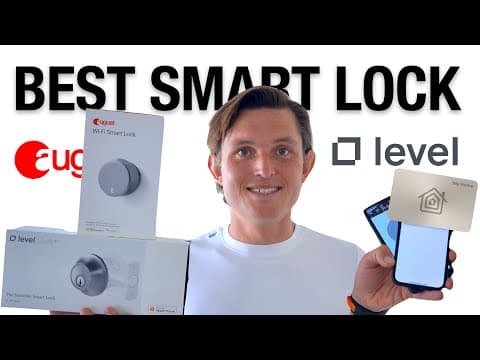
Best Smart Lock Battle - Level Lock+ with Apple Home Key vs August WiFi Smart Lock
This video compares the Level Lock+ with Apple Home Key against the August WiFi Smart Lock. The host reviews each model across installation, digital setup, hardware design, connectivity, and battery life. It also evaluates their companion apps and everyday locking methods before providing a final recommendation and pricing breakdown.
Watch on AgentCDNChapters
Introduction and quick recommendation
The host provides a quick verdict for Android and iOS users before introducing the detailed comparison between the August Wi-Fi Smart Lock and Level Lock+.
Installation comparison
The video walks through the hardware installation of the August Smart Lock and compares it to the more demanding installation process required for Level Lock+.
Setup and smart home integration
The host evaluates the initial digital setup and smart home pairing process for both devices, noting August's smooth multi-ecosystem integration and Level's Apple HomeKey nuances.
Design and aesthetics
A comparison of the visual design and physical presence of both locks, contrasting August's retrofit bulk with Level Lock+'s hidden interior deadbolt engineering.
Connectivity, battery life, and future standards
The host discusses the trade-offs between August's built-in Wi-Fi and Level Lock's Bluetooth/NFC approach, detailing battery longevity, remote hubs, and Thread support.
Companion apps and user experience
Both companion mobile applications are compared in terms of user interface, activity logs, access sharing options, and overall usability.
Daily locking and unlocking methods
The host demonstrates the various ways to lock and unlock each device, highlighting August's DoorSense sensor and Level's Apple HomeKey and NFC capabilities.
Pricing and final verdict
The host breaks down pricing, available budget alternatives, and gives his final buying recommendations for both smart locks.
Transcript
If you're predominantly an Android user, your best bet would be the August Wi-Fi Smart Lock that comes with Google Assistant support and is absolutely the easiest to set up, requiring just 15 minutes to replace your existing lock. If you're predominantly an iOS and iPhone user, your best bet would be the Level Lock Plus that comes with Apple HomeKey support as well as is completely invisible. It doesn't look anything like a smart lock. That's it. That's the video.
If you actually want to see what it was like to install those 2 locks, how to set them up, the connectivity, the battery life, as well as the user experience both on iOS and Android devices within the ecosystem of Google, Amazon, and Apple, then continue watching the video. Feel free to skip around to any of the sections that interest you most. I chose these 2 smart locks as they're some of the most popular ones out there today based on Amazon reviews, and I've used them for a while.
I believe they're the best looking, easiest to set up, and most feature-rich locks out there. I previously used also August Basic Smart Lock as well as the Schlage Connect. And similar to the latter, like Yale and Kwikset, I just don't like the looks of those big keypads and locks that just shout, I'm a smart lock, because I believe all of the smart home stuff should really be seamless, integrated, and fade into the background. First, let's talk about installing, and this is an area where August dominates.
Everything comes in a super nice box with the lock, the plates, the adapters easily laid out, and then you get into the step-by-step guidance from the app helping you to replace the existing lock. You just have to take off the knob inside the lock as well as the plate, and then replace it with the plate that comes from the August lock, screw it into place, choose a correct adapter, and then use the wings to attach the lock to your door.
And then open the magnetic cover, put in the batteries, and that's it. You're ready to go. It literally takes you 15 minutes, and it's a super seamless step-by-step guide in the August app guiding you through the process. It is a whole different story installing the Level Lock Plus, where the Phillips screwdriver is not enough. It all comes in a nicely laid out box with almost everything that you need, but if you're installing it to somewhere like an older door as I have, you also need a drill most likely to drill new holes to fit the lock, as well as make sure that the strike plates that you have to replace because it's a different shaped bolt also fits perfectly to your door.
It took me quite a while, and they don't do a really good job in their user guide guiding you step by step, as opposed to August which did it really clearly in the app. This one is not on paper, and for troubleshooting, I had to go back to their online help section multiple times. For example, things like that the lock needs to be in an open position when you install it, otherwise it's not even going to turn on. So this definitely goes to August. It's much more seamless and easier, not just meaning that you replace fewer parts, so it takes less time and less effort, but also it's a much more seamless experience in the app, helping you get started on your own rather than going out and searching for help.
Once you've got the locks installed, Now let's move on to the setup, meaning you're making the locks actually smart. And this is where August shines again, where August Lock guides you through the install process. It also guides you through the setup process, getting it connected to your Wi-Fi, also making sure that you're connected to your Google Home, Alexa, as well as adding it to your Apple HomeKit. For me, everything went super smoothly and it just works. Setting up the Level Lock was much more confusing.
First, it failed the first 2 times I was trying to do it. Then I was able to add it to the Level app, and as a next step, it guided me to add it to Apple HomeKit, which I did. But then I realized it doesn't include the HomeKeys. So I went back and reset the lock again, added it to my Apple Home app first without touching the Level app. That enabled Apple HomeKey for me. Then I went back to the Level app and also added it there, which worked. So I was able to use it both in the Apple app as well as the Level app.
But then I tried to add it also to my Amazon account or connect it with the Ring services or Alexa services. And that didn't work. It was just showing me that failed connection failed. But then when I went back to the app, I realized it was actually showing errors that you have to choose one of the 3, meaning you set it up as a Bluetooth only, which you can use it in the app and you can use it in HomeKit but without the HomeKeys. You can use it just with HomeKit predominantly.
That means you won't have access to the Alexa features. Or you choose it with the Alexa features, but then you wouldn't have access to HomeKit as well as the Bluetooth version in the app. So you have to choose one of the 3, and it's very confusing that you kind of have to trial and error your way through it. While overall August was much more of a seamless experience for me to set it up, I have to give it to Level as well because they are able to set it up without using the app at all.
You could just use the pre-installed Apple Home app on your phone and add the lock without ever touching the Level app. So let's call it a tie for setup. Moving on to the looks and aesthetics, which matter if you have the lock in a space that you use regularly and it needs to fit into the environment. And while the August lock looks very minimal and sleek, it actually adds quite a lot of bulk and definitely shouts, I'm a smart lock, from the inside, while from the outside it obviously remains the same and nobody can tell that you're even using a smart lock.
But nothing beats the design of a Level Lock Plus. It is a very thoughtful design utilizing the otherwise empty space within the door and making it truly invisible from the inside and outside, fitting into almost every environment. It comes in 2 colors, like a lighter satin nickel, and it comes in a darker brushed color depending on the environment you need to fit it in. While both of the locks are Red Dot Design winners, August in 2014 and Level in 2021, I'd have to give it to Level for the most thoughtful, seamless design, especially if you care about the looks, having it in a space that you use regularly.
Talking about smart features, let's move on to connectivity and battery life. And this is where August lock really shine. Together with its Wi-Fi and Bluetooth support, it has become a true cross-platform champion, enabling you to use Google, Amazon, or Apple ecosystems interchangeably. This has come at a cost to the battery life. So even with 2 larger batteries, they allow you to get 3 to 6 months. And in my experience with a power-hungry Wi-Fi enabled, it gets you more like 3 months and no more.
However, August has already delivered a cross-industry interoperability while the rest of the industry is still working on the new standard called Matter. Level Lock does not include Wi-Fi. It only supports Bluetooth and NFC, meaning that by default you're only able to interact with the lock when you're in close proximity, unless you connect it to HomeKit, in which case your HomePod or your iPad can act like a transmitter from the Bluetooth and connect it to the internet using Wi-Fi so you can see notifications as well as interact with the lock remotely.
The same applies to Amazon Sidewalk technology, which allows you to interact with through Ring and Alexa while you're not at home. Because Level only utilizes the low-power Bluetooth antennas, it means that the battery life extends up to 12 months. But this is not where it stops. With a recent announcement from their CTO, they said they've been silently building in also Thread radios. Thread is an alternative to Bluetooth, and contrary to Bluetooth, is using the internet protocol to connect with other devices in your house.
This is a standard that the industry again has been working together to create a low-powered way for all of your smart home devices to connect to the internet. So once they enable Thread, that would also bring Matter support across industry. So what we just spoke about, the cross-platform champion as August, this might happen to Level in the future as well. But as an overall connection and battery section, I would say it's a tie. While I would give it to Level for the NFC connection, which makes it instant to unlock the door rather than build a connection through Wi-Fi Bluetooth, which sometimes fails and takes a longer time, I still believe that August is a better option to being a cross-platform champion so you can use any of your assistants or any other ecosystems to interact with it.
To be seen in the future if that's gonna change. Moving on to the app and user experience. The apps are very similar for both across platforms. iOS and Android look very much the same, as well as the build and the structure of the apps for Level and August are very similar. On the home screen, you can unlock or lock the lock, On the second tab, you can see the timeline of your lock, so who has opened the lock and when. The better thing for August is you can not just see which app has been used, for example HomeKit was used to unlock the door, but you also see the person, individual who used that feature, which is I think better for August.
Then the third tab is about sharing. You can share an August access in the August app using a phone number or email address based on a date or time, or give them, your guests, an indefinite access. But you could also use any of the ecosystem connected environments. So you could use your Google Home or Alexa app or even Apple Home app to share access to your August lock without needing anybody to download additional apps. Level support with HomeKey means that you can very seamlessly share access to your home using the Apple Home app without anybody needing to download additional apps.
But that means if they're outside of the ecosystem, you still have to go to the Level app using their email address or phone number share access based on date or time, or you could also generate the time-bound link to share with a larger group of people, for example, if you're hosting a birthday party. And the last section is lock settings, where you can use the automations for unlocking and triggers for locking, as well as set up accessories and update your lock. Overall, for the app and user experience, I have to give it to Level.
While the functions are very similar across both of those apps, I love that Level is much more modern and feels fresh compared to August app, which hasn't really changed for the last 8 years since I've been using their locks. Level also adds some of the modern features, things like sharing access using a link rather than knowing everybody's phone number or email address that you want to share your home with. In addition, obviously the Level app experience can be completely taken away and you can use just Apple Home app, for example, when you're sharing access.
So you don't even need to use the app or ask your guests or friends to download the app to be able to operate your lock. This leads us to the most important section of locking and unlocking your door. And that's where also things get more nuanced. For August Lock, you can keep using your old key because the key cylinder hasn't really changed at all. You only change the knob. You could then use the August app on your phone or your watch across both platforms to unlock or lock the door, in addition to the Google Home app, Apple Home app, as well as the Alexa app that all allow you to interact with the, with the door.
As a true cross-platform champion, you can use their respective voice assistants. Whether it is Hey Google or Alexa or Siri that you want to use to lock or unlock your door. August Lock comes with DoorSense, which enables you to not just see when it's unlocked or locked, but also trigger actions based on whether it's closed or open. So you only want to really lock the door when the door is closed rather than lock the door when the door is open, which Levot does a lot of the times.
So this is really helpful feature to help you when you're setting up triggers for locking and unlocking. Level Lock can be unlocked using the 2 new keys that come in the box, as well as an NFC-enabled card, as well as using the Level own app on both iOS and Android, as well as using your watch and phone on an Apple device using HomeKey. This is really the hero feature. This is the make or break of Level experience, for me at least, which means that you don't need to double tap or trigger or open apps or use your voice assistant.
You just put your phone or your watch close to the lock and it just automagically, using the NFC, triggers the action and opens the lock for you. It's the most seamless, fastest experience you will have on a smartwatch when you're using an iPhone. If you decide not to use your Apple HomeKey and give up on HomeKit, you would be able to use Amazon Sidewalk technology, which allows you to use Alexa or Ring to interact with your lock as well.
However, Level Lock has no sense whether it's left open or closed. So oftentimes when I leave the door open just to air the room, the lock automatically closes based on a timer I've set up after 30 seconds because I want the door always to be closed when I leave or close the door. This is not really helpful, to be honest. I wish it had a door sensor built into that because it already has a strike plate, it already has a bolt. So I wish there was some sort of magnet that knows whether the door is open or closed to trigger the unlocking and locking actions based on that.
You could technically work around it by adding, you know, a door sensor and then creating an automation in the Apple Home app, but I doubt that most people will go above and beyond to do that. Both of those locks can be extended using a keypad. For a $50 keypad for August and $70 keypad for Level, you can enable access without anybody having any devices around at all. So overall, as a locking and unlocking experience, I would give it to August if you're using an Android device just because of the seamless experience with Google Assistant.
And I would give it to Level if you're using an iOS or Apple ecosystem. So to conclude, what is the better value for money or better option? To be honest, neither of them, because both of them represent the flagships of each of the brands. And for August, it costs $229 while it's often on sale for $190. Check the pricing on the links below. You could get the same for the August Smart Lock together with the Connect Hub for just $150, doing all of the things that we've already talked about without missing a feature.
However, August as an ecosystem will still be missing the HomeKey support because it doesn't include the NFC antennas, and it will be much bulkier than the completely invisible Level Lock. Level Lock Plus is $100 more, costing you $329 and being an Apple Store exclusive product, but it does give you the HomeKey support and the best-looking smart lock out there. However, if you're willing to give up on the HomeKey support and you just want to get the best-looking, most invisible smart lock out there, you could get their cheaper $199 version of the Level Lock that doesn't include the HomeKey.
Thank you very much for watching. I hope you enjoyed it. If you did, please give it a thumbs up and see some of my other videos on the connected home. For example, how to best improve your sleep using an Eight Sleep mattress. Until next time.