







ChatGPT moment for driving - Full Self Driving (Supervised) is here!
By Sander SaarPublished Updated Length
Loading YouTube player.
ChatGPT moment for driving - Full Self Driving (Supervised) is here!
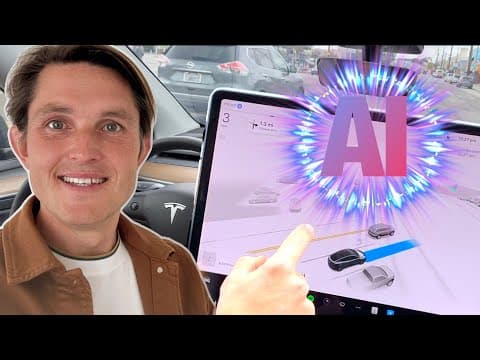
Sander Saar tests supervised Full Self Driving (FSD 12.3.3) in a Tesla Model Y on roads in Los Angeles, including Venice and Santa Monica. Starting from a residential street, the car yields to a pedestrian and a wheelchair user before turning onto a multi-lane road. While driving, he explains that the system is no longer in beta, uses an inward-facing camera to monitor his eyes, and no longer nags him to hold the steering wheel as long as he watches the road. He demonstrates the touchscreen's 360-degree 3D visualisation and live camera feeds, noting smoother acceleration and braking as the vehicle navigates city streets, merges onto a freeway, and stops at a zebra crossing for a pedestrian hidden behind pillars. Upon arriving at his destination, he selects a space on the screen and activates Auto Park, which reverses the car into the spot. He concludes by considering the time the system could save commuters and weighing its $200 monthly or $12,000 upfront cost, remarking that it makes normal cars feel outdated.
Watch on AgentTVAsk about this video
Chapter summaries
Starting the supervised Full Self Driving ride
The driver introduces supervised Full Self Driving in his Tesla Model Y and begins driving from a residential street, slowing for a pedestrian and a wheelchair user before making a left turn onto a multi-lane road.
On screenInside a Tesla during daylight, a man with light brown hair wearing an orange jacket over a white shirt with a small microphone clipped to it sits in the driver's seat. In front of him is a dark grey steering wheel with a silver emblem and a large centre touchscreen, which initially shows an image of a dark car alongside a map. The view shifts to the steering wheel and the touchscreen, which displays a driving visualisation with a blue path, a street map with a blue route, and later a small camera view of the road ahead, along with navigation labels such as Lincoln Blvd, Olympic Blvd, End Trip, and the prompt 'Please keep your hands on the wheel. Be prepared to take over at any time'. As the car moves down a narrow residential street lined with parked cars, pickups, SUVs, trees, and houses, the driver's face is reflected in the rearview mirror and his hands occasionally gesture near the wheel. Through the windscreen, the car approaches a wide intersection with a marked crosswalk where a pedestrian in a dark top and red trousers crosses, followed by a person in a wheelchair, with traffic and storefronts visible across the street. The steering wheel turns as the car makes a left turn onto a wider multi-lane road with yellow dividing lines, passing other vehicles, trees, streetlights, and storefronts including one with colourful wavy painted windows, while the driver shows a wide-eyed reaction in the rearview mirror.
Exploring the real-time cameras and 3D visualisation
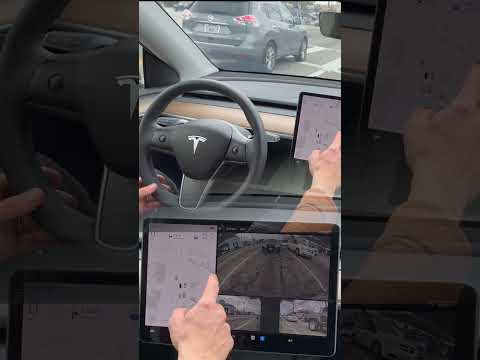
Stopped at an intersection, the driver explains that Full Self Driving is no longer in beta and uses an inward-facing camera to track his eyes. He demonstrates the live camera views and the 360-degree 3D visualisation on the touchscreen while driving.
On screenAn interior view from the passenger side of a Tesla in daylight shows a black steering wheel with a silver Tesla logo, a light wood-trimmed dashboard, and a large central touchscreen. The driver's eyes are reflected in the rearview mirror as he gestures, points up towards the mirror, rests a hand on the wheel, and taps the screen. While stopped at a city intersection behind a grey SUV, with a white car crossing, traffic lights, and storefronts with blue awnings visible through the windscreen, the touchscreen first displays a split view of a top-down vehicle visualisation and a map with a blue route labelled with locations such as Olympic Blvd and Lincoln Blvd in Venice, CA. The driver taps the screen to switch to a split layout showing the vehicle visualisation alongside three live camera views of the surrounding street. As the Tesla moves forward through the intersection and drives along a multi-lane city street, the screen displays a full-screen 3D visualisation of grey vehicle shapes, road markings, and a blue planned path ahead of a black car icon, before returning to the split view with the 3D visualisation and three live camera feeds. Through the windscreen, green traffic lights, yellow lane markings, oncoming and parked cars, a white SUV, a white truck, and colourful storefronts pass by.
Navigating city streets and merging onto the freeway
The driver notes that acceleration and braking are much smoother than in previous beta versions. The car navigates a familiar multi-lane route, moves into the right lane, and smoothly merges onto the freeway.
On screenViewed from the passenger side inside a moving Tesla in daylight, a black steering wheel with a silver Tesla logo and a light wood-trimmed dashboard frame a large centre touchscreen. The touchscreen is split between a driving visualisation showing a blue path and surrounding vehicles on the left, and three live camera views of the road on the right, with on-screen readouts showing speed, battery at 77%, temperature at 64°F, and street names including Olympic Blvd and 20th St. Through the windscreen, the car travels along a multi-lane city street past shops, commercial buildings, trees, traffic lights, pedestrian crossings, and road markings reading KEEP CLEAR, following a white minivan amid other traffic including a white SUV and trucks. The Tesla slows and turns across a crossing onto a wide freeway on-ramp past fences and trees, accelerating as the road curves and merges onto a multi-lane road with greenery, signs, and other vehicles. The driver's face is reflected in the rear-view mirror, while occupants in dark clothing, one with a brown sleeve, rest their hands near their laps and occasionally gesture or point towards the screen.
Hands-free supervision without steering wheel nags
The driver highlights that unlike previous versions, the car no longer nags him to hold the steering wheel as long as he pays attention to the road.
On screenInside a moving Tesla in daylight, the black steering wheel with the Tesla logo on the left rotates as the car navigates traffic, turns at an intersection, and travels along a multi-lane city road. The large centre touchscreen displays a driving visualisation with a blue path on the left and three live camera feeds of the surrounding streets and cars on the right, alongside on-screen readouts including 'PRND', '60 mph', 'MAX 65', battery percentages, times, temperatures, and street names such as '20th St' and 'Broadway Pl'. Through the windscreen, other vehicles, road markings, pavements, greenery, buildings, and a marked pedestrian crossing are visible. Occupants in dark clothing, one with a brown sleeve, sit with their hands resting on their legs and occasionally gesture, while the driver's hand rests near the wheel.
Yielding to a hidden pedestrian at a crosswalk
The car automatically slows down and stops at a zebra crosswalk for a pedestrian who was hidden behind pillars from the driver's view, then resumes driving.
On screenInside a Tesla during daylight, the black steering wheel with a silver Tesla logo, light wood dashboard trim, and a large central touchscreen are visible. The car is stopped at a zebra crossing, and through the windscreen a pedestrian crosses the white-striped crossing in front of the vehicle. Occupants in dark clothing, including a driver in dark jeans and a brown jacket, sit with their hands resting on their legs or near the wheel. The touchscreen displays a driving visualisation on the left and a navigation map with a blue route on the right, showing labels such as Santa Monica, CA, Main St, South Beach Park, and MUD\WTR gather, alongside status indicators including 76%, 12:45 pm, and 62°F. After the pedestrian crosses, the car moves forward again, with the speed on the screen rising from 2 MPH to 18 MPH, passing a city street with parked cars, road markings, and a green painted lane.
Testing Auto Park at the destination
Upon arriving at the destination, the driver selects a parking space on the touchscreen and activates Auto Park, which pulls forward and reverses the car into the spot.
On screenInside a Tesla in daylight, the view focuses on the black steering wheel with a silver Tesla logo, the black and light wood trim dashboard, and the large central touchscreen, with a yellow-railed roadside visible through the windscreen. At first, the touchscreen displays a parking visualisation on the left and a Santa Monica navigation map with coloured pins on the right. The driver, wearing dark clothing with a brown sleeve, points at and taps the screen to select a parking space and a blue Start button. As the steering wheel turns on its own and the car pulls forward before slowly reversing, the screen displays "Autopark in Progress" and "Press Brake to Pause", showing a top-down parking visualisation with a blue target space alongside live camera feeds of the road, a green painted lane, parked vehicles, and the yellow-railed roadside. The driver keeps a hand near the wheel and occasionally taps the screen. When the car comes to a stop, the steering wheel settles back and the touchscreen shows the car icon centred in the blue space, camera feeds including a parked pickup truck with a red bumper, and the message "Autopark Complete", while the driver gestures in front of the screen.
Is Full Self Driving worth the cost?
Parked on a residential street, the driver reflects on how much time Full Self Driving could save commuters each year and whether it is worth $200 a month or $12,000 upfront, concluding that it makes normal cars feel outdated.
On screenInside the parked car in daylight, the man in the orange jacket and white t-shirt faces the camera and gestures with his hands as he speaks, with the steering wheel, touchscreen, and passing street traffic visible.
Transcript
Forget the doubters, forget the hype. Supervised full self-driving is finally here. Let's go for a ride. All right, let's get it started. We're going to be crossing on streets, uh, also going through freeway, and then some tiny streets as well. Let's see how it behaves. The first tough angle here is going to be making a left turn over 2 lanes going across.
Perfectly slowing down for the pedestrian here. Oh, whoa, whoa, whoa! Another self-driving car! Woo! Ah! And we're off! Woo! That was a tiny bit too aggressive, but we did it. By the way, it is not a beta. This is fully launched supervised full self-driving.
That means that you no longer have to keep your hand on the wheel all the time. It's enough if you're keeping your attention on the road. Because of the inward-facing camera that's constantly looking and tracking your eyes. And I can also turn on the cameras here to show you what the car sees behind me, in front of me. And it's pretty crazy the amount of fidelity in the map here. So if you look at that 360 view, like, this is pretty insane.
And also, while we're driving, all of this is happening in real time. So going back to the camera view to show you what the car is seeing as well. The accelerations and the brakes are much smoother than they've ever been really since I've been on the beta from 10 to 11 to now 12, finally stopping the beta and getting to the full supervised self-driving mode.
I know this route pretty well, I've taken it before with the previous versions and I know where it generally has failed before. So that previous turn would have never happened and we'll soon see the other turns as well. Getting into the right lane because we know that we'll soon be getting on a freeway. It is committed and it's ready to get on the freeway perfectly, going to the first lane, then merging to the faster lane.
And now we're entering the freeway. That was very smooth, very human-like experience, the same as I would do here. And interestingly, like on previous versions version, it would have been nagging me to keep hold of the wheel. But this time it's enough. As long as I'm paying attention to the road, it doesn't really nag me at all.
I didn't even see that there was a pedestrian coming, and it perfectly slowed down, letting the person through. And now we are ready to go again. Well done. Like, it was literally, the person was behind the pillars. I wasn't able to see the person, but it perfectly reacted and let the person go, as you should. And another important factor once you arrive to a destination is finding a parking spot.
So Auto Park's ready, start. It's gonna pull forward, needs to do that because otherwise it's not gonna fit in. And I want to turn on the camera so you'll see what the car is doing as well. We're pretty close to the edge here. All right, Auto Park in progress. We're backing into the parking spot. Rock, paper, scissors, or Navi Dart?
And we made it! Autopark done, complete. Wow, what do you think? Average American spends between 9 to 10 and Europeans 4 hours a week in their car. Full self-driving would give them back between 15 to 30 days every year while increasing the comfort and safety in their car. But is it worth the $200 a month or $12,000 when you buy the car?
It does certainly feel to me like going from a full self-driving car to a normal car, like going from a normal car to a horse. It's really that big of a difference. And I hope you get to experience it soon as well. Thank you very much for watching, and I hope to see you next time.