












ChatGPT Search might become the new Google
By Sander SaarPublished Updated Length
Loading YouTube player.
ChatGPT Search might become the new Google
The presenter compares ChatGPT Search with Google, Perplexity and Gemini, focusing on its personal context and continuous conversations. Using a California coast road trip from San Francisco to Los Angeles as an example, he compares source citations across the platforms, notes that Gemini's map routes inland, and tests follow-up queries for weekend weather and personalised recommendations. He also demonstrates real-time updates for personalised news feeds, weather forecasts, stock price tables and maps. Finally, he explains how to access ChatGPT Search without ads or SEO clutter by installing OpenAI's browser extension from the Chrome Web Store or using the Search icon in the mobile ChatGPT app.
Watch on AgentTVAsk about this video
Chapter summaries
Introducing ChatGPT Search and comparing sources
The presenter introduces ChatGPT Search as a rival to Google and Perplexity, noting its personal context and continuous conversations. Using a California road trip from San Francisco to LA as an example, he compares how many sources Perplexity, ChatGPT, Google and Gemini cite.
On screenA man in a brown overshirt over a white t-shirt with a small black lavalier microphone on his chest stands centred in the foreground, speaking and gesturing with his hands against a white background displaying screen recordings. The background first shows an OpenAI webpage titled "Introducing ChatGPT search" with black text and small images of coastal scenery and food on the right, followed by an answer page featuring orange and pink charts, a dark thumbnail with colourful icons, and bulleted news highlights. Next, a ChatGPT 4o chat screen appears with a scrolling itinerary for a California coast road trip from San Francisco to Los Angeles, showing images of coastal scenery and a scenic highway, daily activities, additional tips, and search result links. The screen then displays a ChatGPT road trip itinerary with sources listed at the top and daily highlights in black text, followed by a Google search screen with blue highlighted result text, navigation tabs, and a photo of the Golden Gate Bridge. Finally, the background shows a Gemini Advanced screen with a California itinerary and a pale green and blue Google Maps view of California featuring a blue route line from San Francisco to Los Angeles, red location pins, and black city names.
Testing context and personalisation on a road trip
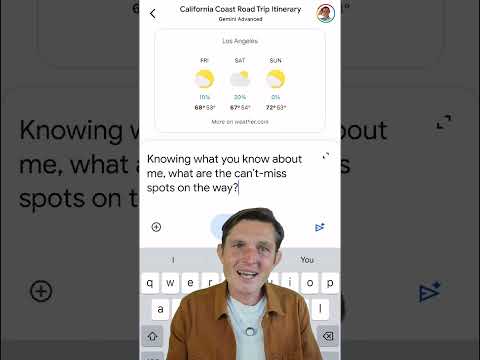
The presenter shows that Gemini's map took the route inland, then tests follow-up questions about weekend weather and personalised recommendations.
On screenA man in a brown overshirt over a white t-shirt with a small black microphone presents in the foreground over white phone screens, smiling, pointing, and gesturing with his hands. The screens first show a weekend weather query with a Los Angeles forecast card featuring yellow sun and cloud icons and temperatures, alongside a ChatGPT 4o weather answer in black text for San Francisco and Los Angeles, with a mobile keyboard visible at the bottom of some screens. A Gemini Advanced screen then displays a question about can't-miss spots on a California Coast Road Trip Itinerary, with a large red hand-drawn circle highlighting the opening lines of the text response. Next, a white ChatGPT screen displays a searching the web indicator, sources, a row and grid of colour coastal and forest road photographs, and a list of California locations including Half Moon Bay, Santa Cruz, and Monterey with small colour thumbnail photographs of beaches, towns, and landmarks beside black text.
Real-time news, stocks and maps
The presenter highlights that ChatGPT Search keeps context, understands user preferences and provides real-time updates on personalised news feeds, stock price tables and maps.
On screenA man in a brown button-up shirt over a white t-shirt speaks to the camera and gestures in a picture-in-picture inset in the lower foreground over a screen recording. Behind him, the screen first displays a ChatGPT 4o interface showing a personalised news summary about Perplexity AI with a red oval highlighting part of the text at the top. The background then cycles through light blue and white search cards for a weather forecast, a stock price chart and a map under category tabs for Weather, Stocks, Sports and News. Next, the screen shows a Chrome Web Store page for the ChatGPT search extension with browser screenshots. Finally, the view switches to a mobile ChatGPT app screen with a light background, a message box, suggestion prompts, an on-screen keyboard and the Search icon highlighted in a red oval.
Installing the browser plugin and using the app
The presenter explains how to access ChatGPT Search without ads or SEO clutter by installing OpenAI's browser plugin or using the mobile app.
On screenThe man speaks in a picture-in-picture inset over screen recordings of a personalised news screen, weather, stocks and map cards, a Chrome Web Store page for the ChatGPT search extension, and a mobile ChatGPT app screen with the Search icon highlighted in red.
Transcript
Google killer has arrived. Perplexity and Google AI Overuse brought AI to search, but Perplexity lacked personal context and Google couldn't support continuous conversations. Imagine planning a road trip from San Francisco to LA. Most AIs give you a decent itinerary. Perplexity used 8 sources, ChatGPT used 18, but Google and Gemini didn't cite any, even though they usually do, and just generated the response. And Gemini created a map that took you inland instead. Then you ask, what's the weather like this weekend?
Google can't continue conversation. Gemini forgot the context of the road trip, but Perplexity and ChatGPT provided answers based on previous chats. Next, you ask, based on my preferences, what are the can't-miss locations? This is where it gets interesting. Perplexity gives a general answer, but ChatGPT remembers your history, previous chats, and provides a personalized reference response. It keeps context, understands your preferences, and offers a real-time update on personalized news feeds, stock price tables, and maps.
You can install OpenAI's browser plugin to access the personalized search experience without ads and SEO clutter, or use it in their app.