







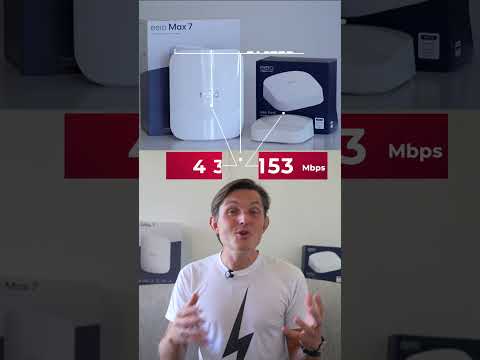






WiFi 7 vs WiFi 6 - Real Life Tests with Eero 7 Max vs Eero 6 Pro
By Sander SaarPublished Updated Length
Loading YouTube player.

WiFi 7 vs WiFi 6 - Real Life Tests with Eero 7 Max vs Eero 6 Pro
This video compares Wi-Fi 7 with Wi-Fi 6 through real-world performance tests using the Eero Max 7 and Eero Pro 6 mesh routers. It explains key Wi-Fi 7 features, including 320 MHz channel width, Multi-Link Operation, and 4K-QAM encoding. Sander evaluates download speeds and transmission rates across four locations with an iPhone 16 Pro, Pixel 9, and MacBook Pro, concluding with hardware specifications and buying recommendations.
Watch on AgentCDNChapters
Introduction to Wi-Fi 7 vs Wi-Fi 6 testing
Sander introduces the head-to-head comparison between the Eero Max 7 and Eero Pro 6 mesh router systems.
The Wi-Fi 7 promise and modern household demands
Sander contrasts theoretical speed claims with real-world internet needs, covering average home bandwidth and the surge in connected devices.
Wi-Fi 7 technical innovations explained
An explanation of the three major technological improvements in Wi-Fi 7: 320 MHz channel width, Multi-Link Operation (MLO), and 4K-QAM encoding.
Real-world testing: download speeds and transmission rates
Sander tests real-world performance across four locations using an iPhone 16 Pro, Pixel 9, and MacBook Pro, measuring download speeds and direct transmission rates.
Hardware comparison: Eero Max 7 vs Eero Pro 6
A direct comparison of the hardware specs of both routers, highlighting CPU, RAM, 10 Gb Ethernet ports, coverage area, and device limits.
Buyer's recommendations and price verdict
Sander outlines recommendations based on internet plan speeds, home size, and connected devices, concluding with a price comparison.
Transcript
Wi-Fi 7 delivers 2.2 times faster real-world speeds with peak improvements up to 3 times, given your internet speed is higher than 200 Mbps. In addition, the new Eero Max 7 maintained 80% of its speed through the walls, something that Wi-Fi 6 couldn't achieve. That's the video. You can find the link to get one below. But if you want to understand these numbers and see if it's worth upgrading, stay tuned. Hi, I'm Sander and I believe in technology.
Today we're diving into Wi-Fi 7 technology, testing out the new Eero Max 7 against the Eero Pro 6. We look at the performance across 4 different locations, test with both Wi-Fi 7 and Wi-Fi 6 devices, and analyze over 300 speed measurements to give you the complete picture of what this upgrade actually means for your network. Wi-Fi 7 arrived with promises of theoretical speeds 4.8 times higher, up to 46 Gbps compared to Wi-Fi 6's 9.6 Gbps.
But we all know that those theoretical speeds rarely match the real-world performance. The average US household internet speed is now 220 Mbps, up from 72 Mbps when Wi-Fi 6 launched in 2020. What's changed since Wi-Fi 6? The number of connected devices in an average home has jumped from 11 to over 20, and that's expected to reach 30+ in 3 years. We're also seeing more demanding applications like 4K streaming, cloud gaming, smart home devices adding constant background traffic.
So, the question isn't necessarily about the peak speeds, but rather how Wi-Fi 7 handles this increased demand while maintaining performance through walls across multiple devices. Wi-Fi 7 brings 3 major innovations that work together to deliver better performance. First, the channel width has doubled to 320 MHz compared to Wi-Fi 6's 160 MHz. Think of it like doubling the number of lanes on a highway, more data can flow simultaneously.
This wider channel alone contributes to about 40% of Wi-Fi 7 speed improvements. Second, it introduces multi-link operation, or MLO. Your devices can now use multiple frequency bands at once. Let me break this down. Wi-Fi 6 devices could only use one band at a time, either 2.4 GHz, 5 GHz, or 6 GHz. With MLO, your phone can receive data through both 5 GHz and 6 GHz simultaneously.
It's like having 2 internet connections working as one. If one band experiences interference, MLO automatically shifts more data to the cleaner band. This accounts for roughly 35% of the performance improvement. And third, Wi-Fi 7 uses 4K-QAM encoding, up from Wi-Fi 6's 1K-QAM encoding. This packs 20% more data into each transmission. In real terms, Wi-Fi 6 sends 10 bits per every transmission, and Wi-Fi 7 sends 12 bits every transmission.
This gives a 20% efficiency gain and compounds the other improvements. Combined, these 3 technologies contribute to Wi-Fi 7's theoretical 4.8 times speed increase over Wi-Fi 6, but as we'll see in our testing, real-world improvements can actually even exceed this in some scenarios. I tested both single and dual router setups in 4 locations: next to the router for baseline performance, then at my desk, which is one wall away, typical home office setup, Then in the living room, which is 2 walls away, using a mesh router, which is a common streaming scenario, and then outside, kind of the worst-case scenario, using a mesh router, testing the range limits.
I used 3 devices to represent different technology generations: the iPhone 16 Pro Max with Wi-Fi 7 support, with Pixel 9 and Wi-Fi 7 support, and a MacBook with Wi-Fi 6 support. Then I did 5 speed tests per device, per location at different times of the day. Let's look at 2 types of speed tests. First, we'll check the actual download speeds you'd get with your internet service, and then we'll look at transmission rates, which actually shows the true router-to-device speed without being limited by your internet connection.
Download speeds next to the router: Eero Pro 6 achieved 204 Mbps on average. Eero Max 7 more than doubled it, getting 454 Mbps on average. My theoretical maximum with an Ethernet cable to the router is around 660 Mbps, so I'm able to maintain around 70% of the speed via Wi-Fi 7, which is delivering more than double the speed of Wi-Fi 6.
If you're paying for a gigabit internet, this difference could be even more dramatic. Living room performance, 2 walls away using the mesh networking, Eero Pro 6 delivered 121 Mbps on average, while Eero Max 7 delivered 365 Mbps on average. This is where it gets interesting. Wi-Fi 6 lost almost half of its speed through the walls, while Wi-Fi 7 only dropped by 20% through mesh networking.
This is another level for Wi-Fi 7. In real terms, this means that your 4K streaming and video calls will work just as well in the living room as they would do next to the router. Now let's take a look at transmission rates, which is the direct speeds between your router and your device, which shows the true capability of Wi-Fi 7 without internet speed limitations. Next to the router, Wi-Fi 6 hit 1200 Mbps, while Wi-Fi 7 doubled it at 2,400 Mbps.
Through 2 walls, Wi-Fi 6 dropped to 648 Mbps through mesh networking, while Wi-Fi 7 maintained an impressive 2,400 Mbps even through mesh networking. Outside, Wi-Fi 6 fell to 306 Mbps, while Wi-Fi 7 still delivered double the transmission rate of Wi-Fi 6 at 1,152 Mbps. These transmission rates, show the router's raw capability.
Imagine it as the size of your home's internet pipes. You know, even though your internet plan might not be this fast, but having larger pipes means better performance when multiple devices are using the network at the same time. Device-specific performance also revealed fascinating patterns. iPhone 16 Pro supporting Wi-Fi 7 got 122% faster speeds overall. Pixel 9 supporting Wi-Fi 7 achieved 119% faster speeds than Wi-Fi 6.
And the MacBook Pro, which actually only supports Wi-Fi 6E, still got 67% improvement. The last point is really crucial. Wi-Fi 7 routers significantly improve performance even for the Wi-Fi 6 devices. This improvement comes from better signal processing, more efficient band steering, reduced network congestion, and also enhanced beamforming capabilities. The Eero Max 7 brings significant hardware upgrades that enable these improvements.
It's got a 2.8 GHz quad-core processor, twice as fast as on the Eero Pro 6. It doubles the RAM from 1 GB to 2 GB. It offers 10 times faster 10 Gb Ethernet ports versus a standard 1 Gb Ethernet port on Wi-Fi 6 devices and provides 25% more coverage per unit from 2,000 square feet to 2,500 square feet. And it can also support more than 200 devices versus 75 devices before.
Those key technical improvements also include more sophisticated antenna arrays and advanced signal processing, enhanced MIMO capabilities, which we talked about, as well as improved thermal management. So should you upgrade? Let's make it simple. Regarding internet speeds, if your internet plan is under 200 Mbps, you can stick with your Wi-Fi 6 router. But if you're paying for 500 Mbps and faster speeds, Wi-Fi 7 will actually help you get those speeds throughout your home and double from what you're getting from Wi-Fi 6.
That's what happened to me. Regarding space, for small apartments, Wi-Fi 6 is still great. But if you have a larger home where you need consistent speeds throughout walls, Wi-Fi 7's better coverage and better mesh networking makes it worth the upgrade. Regarding devices, if most of your devices are older than 2022, you can stay with Wi-Fi 6. But if you're using the latest phones and laptops, Wi-Fi 7 will give you noticeably better performance. In addition, when you have more than 20 devices constantly connected, Wi-Fi 7 ensures you still get the performance regardless of the total number of devices connected.
At $599, or often on sale for $449, the Hero Max 7 is significantly more expensive than the $249 Hero Pro 6, which is frequently on sale for $199. That's a $250 difference even at the sale price. However, the performance improvement might justify the cost for you. Hope you found this video useful. Let me know if you're looking to upgrade. Thanks for watching, and I hope to see you next time.