











Best Truly Wireless Earbuds - BeoPlay E8, Jaybird Run, Bose SoundSport Free, Apple AirPods - Review
By Sander SaarPublished Updated Length
Loading YouTube player.
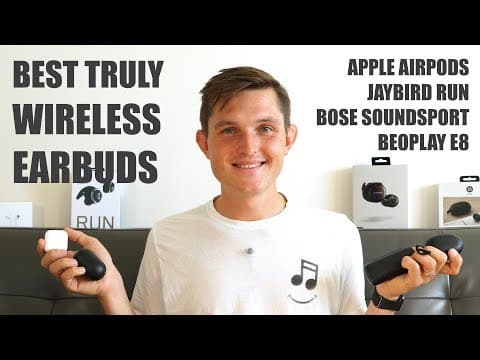
Best Truly Wireless Earbuds - BeoPlay E8, Jaybird Run, Bose SoundSport Free, Apple AirPods - Review
This video presents a detailed comparison of four truly wireless earbuds: the Bang & Olufsen BeoPlay E8, Apple AirPods, Jaybird Run, and Bose SoundSport Free. Host Sander Saar analyzes each model across multiple categories, including build quality, fit, weight, battery life, sound quality, latency, device switching, microphone clarity, controls, connectivity range, and companion apps. After comparing retail pricing, he concludes with specific recommendations based on sound performance, sports use, and daily convenience.
Watch on AgentCDNChapters
Introduction and overview
Sander introduces the wireless earphone comparison featuring Bang & Olufsen Beoplay E8, Apple AirPods, Jaybird Run, and Bose SoundSport Free.
Build quality
Sander evaluates the materials, casing, and durability of the four true wireless earbuds.
Fit and comfort
The host tests the stability, ear tip designs, and comfort of each earphone in real-life use and workouts.
Weight
A quick comparison of earbud weights highlights the lightweight AirPods versus the heavier Bose SoundSport Free.
Battery life
Real-world playback duration and charging case capacities are measured and contrasted across all four models.
Sound quality and profile
Sander compares the soundstage, frequency balance, and audio clarity of each model, noting Bluetooth standards like AAC.
Audio delay and latency
The host reviews video playback and call latency, highlighting significant delays in Bose and Jaybird models versus Beoplay and Apple.
Switching between devices
The process of moving connection between phones and laptops is compared, praising AirPods for seamless transitions.
Microphone test
Microphone recordings from real-world outdoor street tests assess voice clarity and background noise rejection.
Controls and interface
The host demos physical buttons versus touch controls and special functions such as transparency mode and ear detection.
Connectivity and range
Wireless stability, dropouts, step range tests, and firmware update experiences are reviewed.
App experience
Companion mobile apps from Bose, Jaybird, and Beoplay are demonstrated alongside iOS settings for Apple AirPods.
Pricing
A breakdown shows the retail price differences across all four true wireless models.
Conclusion and recommendations
Sander delivers final verdicts, recommending Beoplay E8 for sound, AirPods for daily use, Jaybirds for workouts, and Bose to avoid.
Transcript
Hi everybody, I'm Sanda and I believe in technology. With almost every new smartphone coming out to the market with no headphone jack, we need good wireless alternatives. There's a great variety of Bluetooth headphones out there, but Bluetooth earphones, the truly wireless earphones, are quite new to the market. Let's find out which ones are the best.
I jumped on the Bluetooth bandwagon early and always dreamed of the truly wireless earphones. The first ones that I got to try were the Verge ones about 2 years ago, which I enjoyed, but they were lacking many of the technical capabilities. And the first ones that I was actually able to use day-to-day were the Apple AirPods. Since then, the technology has developed a lot, and now we have many good ones in the market. In this video, we'll be comparing Apple AirPods to Jaybird Run, Bose SoundSport Free, as well as Beoplay E8.
And we're going to compare all of them from real-life perspective, looking at the build quality, sound quality, connectivity, controls, app experience, and so on, and help you make hopefully better decisions by understanding which ones are the losers and winners and in which category. First of all, let's talk about the build quality, and this is an area where definitely the Beoplay E8 shine because they're made from aluminium. They're a single piece, there's no moving parts, and also high-quality plastic.
They also have a nice leather case that is quite small and fits together magnetically. A really well-designed product. It's followed closely by Apple AirPods, which are made from a single-piece plastic as well, at least that's how they feel, and they feel very high quality and durable, and the case is so small so you can easily slide it into your pocket. Bose, on the other hand, just feels clunky even though it's using also high-quality plastic materials and overall feels great.
It's still very clunky because of the buttons and the overall build and design they've used. Also, the case itself is so big, it's almost triple the size of AirPods and definitely double the size of Beoplay E8s that it's hard to fit them in your pocket. While Jaybird is a total mess. They've used cheap plastic that makes this crackling noise when you use them, push the button in your ear. They do look good, but on the other hand, they don't feel good to use, and they, I'm not sure if they're going to be as durable.
Also, the case that it comes with is much bigger than Beoplay E8 or AirPods, and it feels clunky and very cheap plastic. Now let's talk about fit. Bose feels nice, using the same type of silicone tip that you had with previous SoundSport headphones. That I really enjoyed using, but this time it's completely off balance. It's so high profile that it makes your ears look weird and just downright not nice to wear at all.
It also, the fin is the only thing that's keeping it in. If you didn't have that, it would fall out straight away. And also when you're running, they just bump up and down. It doesn't feel comfortable or secure at all. Jaybirds, on the other hand, feel great. They also have the fin structure, and when they go in, they stay in. They have very low profile. They look nice and they feel nice. You don't almost feel that you wear them. On the other hand, Jaybird Run as well as Beoplay E8 introduce moving sounds when you're using the silicone ear tips, so you can hear your steps when you're moving around, which is definitely annoying.
It can be resolved on Beoplay E8 when you're using instead of the silicone tips the foam tips, where you don't hear it at all, but it will remain on the Jaybird Run. Beoplay E8 fit is super comfortable. They're so lightweight you can just put them in and forget about them. They also have a similarly low profile do the Jaybirds. So they look nice, they feel nice, and they're easy to use. I think the Jaybirds feel more secure because the fins, but I've never had issues or the Beoplay E8 coming out of my ears.
And Apple AirPods have the classic Apple fit. They either fit or they don't. In my case, 99% of the time they work just great, and only the situations where I'm indoors in a sweaty environment, that's where they come out and they don't work for me. So for example, when I'm running inside, And that's why I'm turning more towards Beoplay E8 or Jaybird Run for these occasions. But you have to try them. If the previous AirPods with cable worked for you, then the AirPods will also do.
They're all relatively lightweight. While the Apple AirPods are the lightest at 4 grams, the Beoplay E8 as well as Jaybird Run don't feel any different when they're between 6 and 7 grams. Usually the right one, which is the master one, is about 7 grams, and the slave is about, the left one 6 grams. On the other hand, the Bose SoundSport Free are double the weight at 14 grams, and you can totally feel it in your ear. It's dragging you down and it doesn't feel right.
Now let's talk about battery life. Both Bose and AirPods promise you 5 hours of listening time, while on the Beoplay E8 and Jaybird, they promise 4 hours. In reality, in my experience, the Apple AirPods lasted the longest, about 4 or 4, 4.5 hours, and The Bose SoundSport Free lasted about 2.5 hours in my experience, which is half of what they promised. And Jaybird and Beoplay E8 lasted both about 3 to 3.5 hours on single charge.
Their cases carry additional 8 hours of charge for Beoplay E8 and Jaybird, additional 10 hours for Bose, and additional 19, double as much, for the Apple AirPods. Now let's talk about sound, as that's one of the key differentiators between all of these earphones. And one of the things impacting it is also the Bluetooth standard that they support. While everything else apart from Beoplay E8 is using Bluetooth 4.1, Beoplay E8 supports Bluetooth 4.2, which also supports higher bandwidth and also more secure connections.
And it also supports the AAC standard for higher quality audio. When listening to the earphones in real life, Bose sounds like traditional Bose. It's very strong, bass-heavy, slightly muddy in the center and very loud earphones. I think it sounds good for your day-to-day use or in sports environments depending on your taste, but it's not for me. It's not clear, it's not large soundstage, it's just very strong bass, very strong highs, and not much happening in the middle.
Jaybirds, on the other hand, promise the adjustable sound through the app. They're very powerful but get distorted very easily. Even when you hear the controls in your earphones, they are distorted, the voice is distorted, so you never get that clarity. But you can easily adjust it to your taste, having a really strong punch in the bass or really strong highs. It works across the board, and that's something that Jaybird is really exclusive for, known for as well.
One thing to keep in mind with Jaybirds is that it also introduces this hisser noise when you're using them silently, which I didn't have on any other of the headphones, which are completely silent when I didn't play any music on them. Apple AirPods are kind of like the middle ground of everywhere. It's got some bass, you can hear some of the middle end, and also you can hear the high end. It doesn't have this punch or loudness as did, for example, the Bose, as well as if you adjust the Jaybirds, but it's a good, well all-around sound which I really enjoy.
It's pleasant to use and works great for speech and music. The best sounding Bluetooth earphones overall that I've tested are definitely the Beoplay E8. They just have such a large soundstage, so powerful sound all the way to the maximum volume. They don't get distorted even though they're not as loud as Jaybirds or Bose, for example. But you can also adjust the soundstage yourself in their app when you're using podcasts versus listening to music and so on.
They just sound amazing and you will not be disappointed. From sound and Bluetooth connectivity point of view, another thing that I wanted to test is the delay that you have between the device and your earphones. For example, in Bose case, the delay was about almost 2 seconds, which makes it completely unusable when you're watching video, editing video, or even want to use it for voice calls or video calls. The delay on Jaybirds is probably half as much, maybe only a second, but it's still annoying so that it's so off that you can't watch and it just drives you crazy.
So better don't use it when you're watching video, doing video calls, and so on. Surprisingly, Beoplay performed really well in this category, maybe because they have the Bluetooth 4.2 standard, but there was almost no delay, or if there was, it was very little, so you can't even notice. And I also used them for editing purposes, and it worked absolutely fine. Obviously, Apple AirPods working with MacBook and also iPhone work absolutely fine. Similarly, also with Android devices, there are almost no delays whatsoever.
And the reason for this could be that because Apple AirPods are using both Bluetooth connectivity, the other earphones have a master earphone that takes the connectivity between Bluetooth and and uses a wireless connectivity to direct the sound to the other earphone. So that means there is a delay between the device and delay between those 2 earphones. If you're going to sync these 2 up, there has to be some kind of delay in order to allow that synchronization. That's something that to keep in mind, especially when you're comparing these for day-to-day use and also watching video.
Another thing from real-life perspective is switching between devices, because I'm using them consistently on my phone for calls then on my computer to watch video, listen to music, and so on. It was easy with cable, take it out, put it into a new device, done. It doesn't work as easy on many of the Bluetooth earphones. In Bose case, you just have to hold it down for 2 seconds and then go to the other device and connect manually again. It's fine, it's not super easy, but it works well.
In Jaybird's case, you have to turn it off all the way, and then when you turn it on, you have to hold it down until it goes to the pairing mode, and then you can switch to another device. There is no easy way to go between the devices without turning it off. The annoying bit is that when you turn it off, it also turns off the left AirPod, earphone, so you have to turn it, the left one on again separately in order to connect it to a new device. That's annoying and not really a usable scenario.
Switching with Beoplay is almost as easy as with Bose. You just hold with 2 fingers on each side for 1 second and it will automatically go to pairing mode so you connect again on another device. Apple AirPods definitely shine in the area of switching, especially when in the Apple ecosystem you can switch between your laptop and phone or or watch very easily without going into pairing mode or doing anything else than just choosing your output. It also, by the way, works with Android.
When I was using with my Pixel and MacBook, I could go back and forth very easily by just choosing a new device, on a new device, the new output, and it just switches over, which really works like magic, and as it should. Reminds me of taking the cable and putting it in a new device. The others have still a way to go in order to make it seamless. Key area for me using it day-to-day in real-life environments is also calls and the microphone that they have built in. While Jaybird, Bose, and Beoplay all have omnidirectional microphones, meaning they take in all of the surroundings in any directions, Apple AirPods have a performing microphone, meaning that it will tailor the sound to where the sound is coming from and automatically switching between the right and left AirPod depending on which one you're using or which one is closer to the voice.
I must say the microphones in Jaybird are just awful. Listen to the sample.
From the Jaybird truly wireless headphones again. In the streets here, you hear a little bit of noise. People playing a bit. How well they,
Bose sound is a little more usable, but still I don't think it's good for calls. I've had people coming back to me and saying, oh, you must be in a loud environment, I can't hear you well, and then I just switch to my phone to take the call.
This is a recording from the Bose truly wireless sports headphones from the streets. You hear how much noise it's picking up.
Beoplay seems to be having much higher quality microphones in there, even though it's taking in a lot of the background sounds as well. It just sounds much better and clearer and cleaner when I'm using it in an indoor environment or low noise environment.
And this is a recording from the Beoplay E8 wireless headphones. Again, there's noise, street noise, people talking, and cars going. Let's see how good you can hear me.
Apple AirPods, on the other hand, sound almost exactly the same as having a normal phone call because they're using the performing microphones, direct the microphones to where the sound is coming from, and it's much better regardless whether you're using it on an Android device or iOS device. It just works much better.
And now let's see how good the audio sounds coming from the Apple AirPods. Again, there's quite a bit of wind in the background and also people talking. See how good it sounds.
Now let's talk about the controls and the earphones themselves. In Bose's case, they're using many buttons on the earphones themselves. On the right one, which acts as a master one, you have a center button which you can hold down to turn them on. You can push it once to play and pause the music. You can double tap to go to the next song or triple tap to go to the previous song, and also hold it down to activate Siri or Google Assistant. You also have volume up or down on the right one.
The button on the left one can only be used for activating pairing. The only thing is that you can also hear those button clicks when you push them on your earphone, and they're also so strong or tactile that the earphone itself might come off when you push them too hard. Jaybird has a different strategy, and they've embedded one multifunction button on each of the earphones. So when you hold it down, you turn it on. You can push it once to play and pause the music or answer or decline a call.
You can double tap it to go to the next song, and it works the same on the left one as well. You can also hold it down to activate Siri or Google Assistant when you're using them. The only challenge is that it has that plasticky feel and touch, so when you push it out first time, you can hurt your ear when you push it too hard. And also you hear this plasticky cracking noise when you push those buttons, so it's not a very nice implementation, even though software side seems to be working good.
Beoplay E8 is inheriting its controls from the previous larger headphones which were using the touch interface, so there are no moving parts on Beoplay E8. You can hold it to turn it on, you can double tap to go to the next song, double tap the left one to go to a previous song, triple tap to activate Siri, hold on each side for 2 seconds to go to the pairing mode. But it also has got one trick up its sleeve.
If you just touch the left one for once, it will turn on a transparency mode which you can adjust in the app, but it will bring in the ambient noise and sounds around you. So you become aware of that depending when you're commuting or you're doing sports and you need to be aware of the environment around you, or you want to talk to someone without taking your headphones out. Another way that they've also built in, which is similar to Apple AirPods, is when you take the right one out, it will pause the music on your left headphone.
The thing is, it will still continue playing actually the music in the right earphone to keep the connection, But at least it can give you the silence if someone comes to you, take it off, you can talk to them, put it back in, and continue listening to music. Apple AirPods have customizability, so you have to tap it lightly to play or pause the music or activate Siri depending on what you've chosen in the menu. In using the Apple AirPods on Google devices, you can use the right one for double tapping for playback, and you can use the left one for double tapping to go to the next song.
AirPods also have the automatic ear detection. When you take it off, it will pause the music, and if you put it back in, it will continue playing where you left off. And that works on both ones, not as Beoplay E8 where it only works in the right earphone. Another area that is important for Bluetooth earphones is range and connectivity, and they all offer, or at least promise, 9-meter range when walking around. And that seemed to work for some and for some not.
For example, for Bose, initially when I didn't get the software update, it was awful. It was dropping almost every 15 to 20 seconds so it was almost unusable at all. At least the left one was doing it even more often. After the update, it's probably got at least 5 times better. I experienced drops mainly only every 2 minutes and only in the left earphone and not actually fully disconnecting at all. It also, when I was doing my step challenge, it went through all of the 14 steps, so almost covering the whole promised 9-meter distance.
Jaybird had a very similar issue in the beginning before I got the software update. By the way, I didn't even know that the software update was out there because it doesn't show in the app per se, but you have to go to their website, download the software, connect them with a cable, and that's how you can update. They're the only ones that make the updating process so complicated. But after the update, they seem to be quite stable. When I say quite stable, I mean they might be dropping similarly only maybe once every 2 minutes, and only the left one, and never disconnecting both of them.
So it's generally stable and seamless experience unless you're in busy environments where I usually test them. Where you have loads of Wi-Fi connections around that might interfere. In terms of range, it offers very similar, the 14 steps, or maybe 2 steps less, around 12 steps, as compared to the Bose. Beoplay has been fine since the beginning. I received update in that time as well, but it hasn't really changed anything. It's still been a great connection experience.
It's by no means perfect, but it works around 97% of the time. And in terms of range, it also offered the same in my step test, around 14 steps that I was able to take through 2 walls and it worked absolutely fine. The best in the range were definitely Apple AirPods. They allowed me to go 18 steps away and they seemed to be working absolutely fine even in that distance. I never really experienced any drops with Apple AirPods at all.
They update automatically through the app without you even knowing, so it's just a seamless experience overall. All of the earphones also have an app, apart from Apple AirPods, to do some of the basic things that you need to do with earphones. In Bose case, you can use the app to update your earphones. You can also use the voice prompts or not. You can choose the devices that it remembers and also change the timer for automatic turn-off. Jaybird app has got some tricks up its sleeve.
First of all, you can change the sound profile, which is the key selling point of Jaybird headphones overall. In addition, you can see where was the last place you used them on a map, so where was the last Bluetooth connection. You can turn on and off the voice prompts, and and also change the functions of the buttons on the earphones. One thing to note on Jaybird is you cannot update your earphones through the app. You have to use a cable and a PC or Mac. In the Beoplay app, you can first of all change the sound profile of the earphones, so you can create your own or use the existing ones for commuting, for listening to music at home, or podcasts, for example.
You can also update the earphones, which is very easy and takes about 20 to 30 minutes, as opposed to the double that it took on Bose. In addition, you can also use the transparency mode settings and change the levels from commuting to social to ambient, where you can turn on the ambient sounds around you through the microphones that are attached to the earphones, where you need to listen to or be aware what's around you. Apple AirPods don't have an app, so if you're using them on Apple iOS devices, you can go to the Bluetooth menu to change the different button layouts and functions, but nothing else you can change in there, and the updates are done automatically.
If you're using AirPods on an Android device, you don't have those functions in the Bluetooth menu. While we've been comparing these earphones, there's a huge difference in price. Apple AirPods cost $159, Jaybird Run cost $179, in a similar price range. The Bose SoundSport Free cost $249, and Beoplay E8 costing almost the double from the cheapest at $299.
So to conclude, if you're looking for an amazing sound quality good connectivity, good lightweight fit, and an okay microphone, go with the Beoplay E8. You would not be disappointed. They're great, great headphones if you care about music. If you're looking for your kind of day-to-day all-rounder and you're predominantly using your earphones for calls and kind of taking them on and off for music and listening to podcasts, I would go with Apple AirPods.
And even when you're using an Android device, they work absolutely fine, flawless. I've used them with my Pixel and also with my Samsung Note 8, and and they've been absolutely fine. No difference almost from using it on iOS devices. I would avoid Bose SoundSport Free in all regards. They don't have a good fit, they don't have an okay sound, poor connectivity, poor microphones. It's not a great piece of tech. If you're looking for just solely using your earphones for sport and you like this overpowered, super loud sound, I would go with Jaybirds.
But keep in mind that the microphone is really bad and unusable for calls. Thank you very much for watching. I hope you enjoyed this video. Please let me know by clicking on that I button here which ones do you think are the best ones. Leave your comments down below. If you enjoyed it, give it a thumbs up, subscribe to the channel, and I hope to see you next time.