












5 AI Drops from Google I/O 2025 You Can Try Right Now #googleio #io2025 #tech
By Sander SaarPublished Updated Length
Loading YouTube player.
5 AI Drops from Google I/O 2025 You Can Try Right Now #googleio #io2025 #tech
The host presents five AI tools announced at Google I/O 2025, demonstrating each with screen recordings. He begins with Virtual Try-On in Google Search, accessed through the Labs icon in the Google app, which lets users upload a full-body photo to try on outfits and purchase items. Next, he demonstrates Imagen 4 in the Gemini app by generating an image of an astronaut on Mars with text formed by rocket smoke, comparing it with ChatGPT and noting its image-editing features. He then shows Project Mariner, a browser agent that navigates websites, compares prices and searches Gametime for concert tickets under $50 in Los Angeles. After that, he demonstrates Flow and Veo 3 for generating video with synchronised audio, creating a clip of a Google product manager rapping on stage and browsing short films on Flow TV. The fifth tool is Stitch, which he uses to generate an iOS health-tracking app design and code from a text prompt, noting that designs can be exported to Figma. He adds that Gemini Live is free for Android and iOS users in the US for real-time camera and audio conversations, and concludes by outlining the Google AI Pro ($20 per month) and Google AI Ultra ($250 per month) subscriptions required for most of the featured tools.
Watch on AgentTVAsk about this video
Chapter summaries
Virtual Try-On in Google Search
The host introduces Google's new Virtual Try-On tool, accessed via the Labs icon in the Google app. By uploading a full-body photo, users can virtually try on men's or women's outfits and purchase items directly from Google Search.
On screenA host in a brown shirt over a white t-shirt appears in a picture-in-picture overlay at the bottom centre. Behind him, a screen recording scrolls through shopping listings, a Google I/O webpage, the Google app homepage with a circled Labs icon, and a Search Labs page. A full-body photo of a man standing by a white door cycles through different outfits, including a denim jacket, a brown dress, and various shirts and trousers, followed by a product page for Mango linen pleated pants with a Try it on button.
Imagen 4 image generation in Gemini
The host demonstrates Imagen 4 inside the Gemini app, highlighting its improved realism and control over text and characters compared to ChatGPT, as well as its ability to edit existing images.
On screenA Gemini chat interface fills the screen with a typed prompt asking for a photorealistic astronaut having coffee on Mars with Earth in the sky and rockets launching with smoke forming the text "Welcome to Mars!", followed by a generating image indicator and the resulting generated image. Throughout, the host, a man in a mustard-brown collared shirt over a white t-shirt, appears in a picture-in-picture overlay at the bottom with the on-screen label "2. Imagen 4". The screen cuts to a ChatGPT interface showing the same prompt and a different generated image of an astronaut sitting on Mars holding a cup with Earth in the sky, before returning to the Gemini image as the host smiles in the overlay. Next, in a vertical screen recording against a black background, the host is centred at the bottom speaking to camera while the Project Mariner app is displayed behind him with the label "3. Project Mariner". The app shows a "Welcome to Project Mariner" page with four dark suggestion cards, followed by a prompt field with typed text reading "Find cheap LA concert tickets this weekend" and an on-screen keyboard. Behind the host, the interface changes to a split screen featuring a browser window on the left and a Google thinking panel with checkmarked steps on the right, as the browser scrolls through Gametime concert ticket search results and upcoming event listings with artist photos.
Project Mariner browser agent
Project Mariner acts as a virtual assistant that navigates websites on the user's behalf. The host shows it searching multiple sites, comparing prices, and finding concert tickets under $50 in Los Angeles.
On screenAgainst a black background with the host at the bottom centre, the Project Mariner interface displays a welcome page with suggestion cards, a prompt field with an on-screen keyboard, and a split screen showing Google's thinking steps alongside a browser window scrolling through concert ticket listings on Gametime.
Flow and Veo 3 video creation
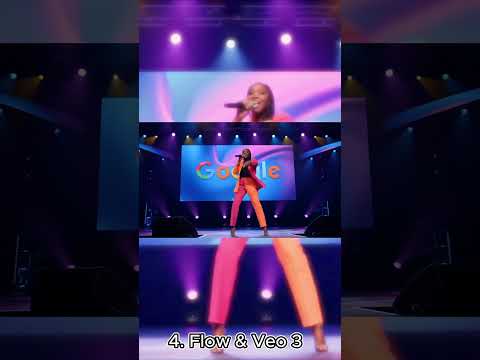
The host showcases Flow, a new video creation app powered by the Veo 3 model that generates videos with synchronised audio. He demonstrates a prompt of a Google product manager rapping on stage and highlights Flow TV, which features short films made with the technology.
On screenThe host, wearing a brown shirt over a white t-shirt, appears in the lower centre against the Flow app on a black background, labelled "4. Flow & Veo 3". Behind him, the Flow interface displays a prompt box, an on-screen keyboard, and menu options for Text to Video, Frames to Video, and Ingredients. A typed prompt is shown in the Text to Video box, and a generated video preview appears at the top showing a woman in a pink blazer and white top holding a microphone on a stage with a Google I/O backdrop. Next, a generated stage performance fills the frame in three stacked horizontal panels, featuring a woman in a bright orange and pink suit holding a microphone under purple and white spotlights in front of a large blue screen with the colourful Google logo, while the top and bottom panels show blurred close-ups of her face and legs. The host then returns at the bottom centre in front of the Flow TV interface, which includes sections for CHANNELS, SHORT FILMS, and FREELANCERS. The screen shows a wide still of parachutists descending over a sandy desert, followed by short film pages with large still images, titles, descriptive text, WATCH buttons, and thumbnail previews, including a New York restaurant scene created by Dave Clark and a dark fantasy image.
Stitch app design to code
Stitch turns text descriptions and screenshots into working app designs and code. The host generates a minimal iOS app for AI-driven health tracking and an AI health coach.
On screenWith the host at the bottom centre, the Stitch BETA interface displays a New Design page with Mobile and Web options, a prompt box, and an on-screen keyboard. Generated health app screens appear, showing a user registration form and activity tracking layouts with steps and calories.
Bonus: Gemini Live for Android and iOS
After noting that Stitch designs can be exported to Figma, the host shares a bonus announcement from Google I/O: Gemini Live is now free for everyone on Android and iOS in the US, allowing real-time camera and audio conversations.
On screenThe host speaks from the bottom centre over a sleep-tracking app screen and a dark code and design screen, before the background switches to a black Gemini Live interface with a blue-purple gradient and Hold and End buttons.
Google AI Pro and Ultra subscriptions
The host explains that most of the featured tools require either the Google AI Pro subscription at $20 per month or the Google AI Ultra plan at $250 per month for maximum limits, before wrapping up with his thoughts on Google I/O shipping real products.
On screenA man wearing a brown shirt over a white t-shirt is overlaid at the bottom centre of the screen, speaking to the camera while smiling, pointing, and gesturing with both hands. Behind him are two white pricing cards for Google AI Pro and Google AI Ultra with feature lists, displaying prices of $19.99 and $0/mo for 1 month for Google AI Pro, and $249.99 and $124.99/mo for 3 months for Google AI Ultra, alongside features such as the Gemini app, Flow, Whisk, NotebookLM, Project Mariner, YouTube Premium, and storage. The background then changes to a scrolling white webpage showing Gemini app and Search articles with dark and colourful image cards, including flowers and a landscape, a search box, and headlines such as "Gemini gets more personal, proactive and powerful" by Josh Woodward and "AI in Search: Going beyond information to intelligence" by Elizabeth Reid.
Transcript
Tap on any outfit to try it out on yourself. That's just one of the 5 AI products Google dropped today at their I/O developer conference, and you can actually use right now on your phone. First up, Virtual Try-On. Go to the Google app, hit the Labs icon, then Try Things On. Upload a full-body pic of yourself, and then pick any outfit, men's or women's, works on both. The AI puts it on you. If you like what you see, you can actually buy it right from there. There are apps out there with similar capabilities like DressXMe and Doji, but this can be really powerful when built right inside Google Search.
Next, Imagen 4. It's built right into Gemini app, where you can generate images with insane control over text and characters and with much higher fidelity and realism than before. You can also edit existing images. It's on par with the best out there, like ChatGPT, but maybe even better. Project Mariner is like having a virtual assistant that navigates the websites for you. I asked it to find concert tickets for under $50 this weekend, and it searched multiple sites, compared prices, and found many options.
It is a browser within a browser, or it can also take over your browser if you like so. Flow is a new video creation app with a V03 video generation model to create videos with synchronized audio. I added a text prompt for a Google product manager rapping about their latest releases on an I/O stage, and here's what I got.
At Google I/O 2025, we shared how we're using our cutting-edge technology to build products that are intelligent and personalized.
You can also check out Flow TV to see the 3 short films that are made entirely with this technology. Stitch turns descriptions and screenshots into working app designs. I said a minimal, clean iOS app for AI-driven health tracking and AI health coach and got this, complete with working code. You can continue the development or export to Figma in If you watched until this far, here's a bonus one.
Google just announced at Google I/O that Gemini Live is now available for free to everyone on Android and iOS in the US.
So you can see what you see from the camera and hear what you hear to have a real-time live conversation. For most of these, you need to get an AI Pro subscription for $20 a month or have the $250 maxed-out limits with Ultra. I'm happy to see that this year's I/O is less about mockups and more about shipping products. What are you most excited about?